

Pega Smart Investigate - Adding new Utility in existing Flow break the final utility
Hi all,
could i please get some help on why after addition of new utility in a Flow, it is not running correctly?
We have AutoResolve flow to setup by operations. Where they set up Time of resolution, Status, Invoice.
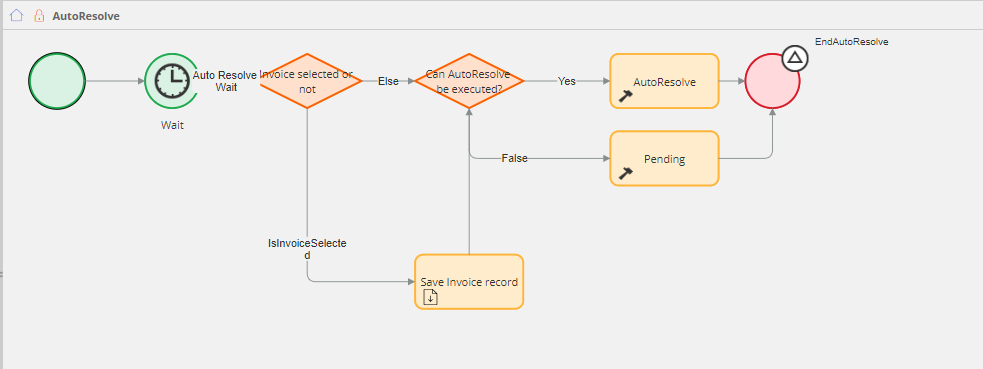
This works fine as is
However, we had been asked to add extra automation where during to AutoResolve setup they also chose if and who to send the final correspondence automatically.
This started to cause some issues
We tried adding it to the AutoResolve Activity, and then another way adding it to the AutoResolve Flow as separate utility (we also tried it with fork ) however it is always ending in the same result => if SendCorrespondence is Yes then the correspondence is sent, but the Auto Resolution does not happen
=> if SendCorrespondence is No then the Auto Resolution work fine
Additionally, if we do not have any Wait time (e.g. the wait shape where we have the time and date of resolution) then the Send Correspondence and AutoResolve works fine.
Therefore we are not entirely sure if it is the Wait shape issue, the Flow issue or something else.
Unfortunately the tracer is not entirely helpful, as there are some failures either way.
Hi all,
could i please get some help on why after addition of new utility in a Flow, it is not running correctly?
We have AutoResolve flow to setup by operations. Where they set up Time of resolution, Status, Invoice.
This works fine as is
However, we had been asked to add extra automation where during to AutoResolve setup they also chose if and who to send the final correspondence automatically.
This started to cause some issues
We tried adding it to the AutoResolve Activity, and then another way adding it to the AutoResolve Flow as separate utility (we also tried it with fork ) however it is always ending in the same result => if SendCorrespondence is Yes then the correspondence is sent, but the Auto Resolution does not happen
=> if SendCorrespondence is No then the Auto Resolution work fine
Additionally, if we do not have any Wait time (e.g. the wait shape where we have the time and date of resolution) then the Send Correspondence and AutoResolve works fine.
Therefore we are not entirely sure if it is the Wait shape issue, the Flow issue or something else.
Unfortunately the tracer is not entirely helpful, as there are some failures either way.
Is there any way to figure out why adding new utility could cause issues in the existing?
Thank you.
Renata

Pegasystems Inc.
GB

Pegasystems Inc.
US
@MarijeSchillern Hi Marije & RenataC5 - this does seem like bizarre behavior - I would recommend logging an INC in MSP as advised by Marije so that our support colleagues can review, attempt to reproduce, identify the root cause and provide a solution.
Best wishes,
Ryan
@ryan.white @oleac could one of you answer this Smart Investigate question?
@RenataC5 if the product is not working as documented, then please log a support incident via the MSP and provide the INC id here so we can help track it.
Most Troubleshooting of Process Logic needs to be carried out methodically.
It seems that the addition of a new utility in your existing flow may be causing conflicts particularly with the Wait shape. The Wait shape can sometimes lead to unexpected behavior in flows especially if it is not configured correctly or if it interacts poorly with other components. To troubleshoot this issue consider the following: 1. Review the configuration of the Wait shape to ensure it is set up correctly. 2. Check if the new utility is affecting the flow's execution order or logic. 3. Utilize the Tracer tool to monitor the flow execution and identify where the process is failing. 4. Ensure that the new utility does not interfere with the conditions set for Auto Resolution. If the issue persists it may be beneficial to revert to the previous version of the flow and reintroduce changes incrementally to isolate the problem.
⚠ This is a GenAI-powered tool. All generated answers require validation against the provided references.
@ryan.white @oleac could one of you answer this Smart Investigate question?
@RenataC5 if the product is not working as documented, then please log a support incident via the MSP and provide the INC id here so we can help track it.
Most Troubleshooting of Process Logic needs to be carried out methodically.
It seems that the addition of a new utility in your existing flow may be causing conflicts particularly with the Wait shape. The Wait shape can sometimes lead to unexpected behavior in flows especially if it is not configured correctly or if it interacts poorly with other components. To troubleshoot this issue consider the following: 1. Review the configuration of the Wait shape to ensure it is set up correctly. 2. Check if the new utility is affecting the flow's execution order or logic. 3. Utilize the Tracer tool to monitor the flow execution and identify where the process is failing. 4. Ensure that the new utility does not interfere with the conditions set for Auto Resolution. If the issue persists it may be beneficial to revert to the previous version of the flow and reintroduce changes incrementally to isolate the problem.
⚠ This is a GenAI-powered tool. All generated answers require validation against the provided references.
Using utility after wait shape is not working
Resolving flow issues by using problem flows