
Question

Infosys
Infosys
IN
Infosys
Posted: Sep 3, 2024
Last activity: Sep 23, 2024
Last activity: 23 Sep 2024 10:04 EDT
Closed
Declare Onchange rule not triggering for real time data flow
I'm trying to trigger an alert email notification as part of data flow status changes(these are real-time data flows running at background processing on dedicated runID's), for that I'm using declare OnChange rule based on .pyStatus (Class: Data-Decision-DDF-Progress)
Requriment:
Activity triggers --> DataFlow --> pyStatus="Completed" --> completed mail notification
Activity triggers --> DataFlow --> pyStatus="failed" --> failed mail notification
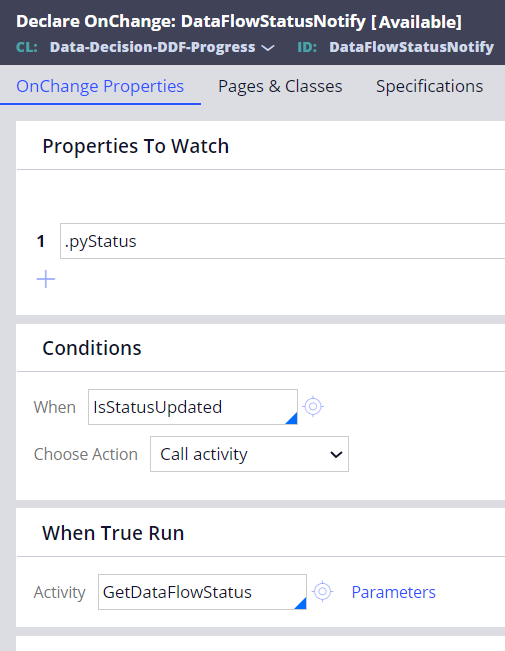
can someone please suggest on any other approaches
***Edited by Moderator Marije to change type from Pega Academy to Product***
To see attachments, please log in.
Posted: 1 year ago

MOD
Pegasystems Inc.
GB
@AdarshaGouda To trigger an alert email notification based on data flow status changes you can use Declare OnChange rules to monitor the .pyStatus property in the Data Decision DDF Progress class. This approach is suitable for your requirement to send notifications when the status changes to 'Completed' or 'Failed'. Here are the steps you can follow: 1. Declare OnChange Rule: Create a Declare OnChange rule to monitor the .pyStatus property. This rule will automatically execute an activity when the value of .pyStatus changes. 2. Activity Configuration: Configure the activity to check the value of .pyStatus. If the status is 'Completed' the activity should send a 'completed' mail notification. If the status is 'Failed' it should send a 'failed' mail notification. 3. Monitoring Data Flows: Use the Call instruction with several activities to track the status of Data Flows. You can use methods like Data Decision DDF RunOptions.pxInitializeProgressPage to create a progress page and monitor the data flow run. This approach ensures that you can track the status of real time data flows and send appropriate notifications based on the status changes.
⚠ This is a GenAI-powered tool. All generated answers require validation against the provided references.
Declare OnChange Rules
Monitoring Data Flows