

Column headers in Constellation tables typically provide both visible and programmatic label text to reflect the data contained in that column. For any tables configured by application authors, the column label by default will display the name of the property shown in that column.
Depending on the operations available in a given table, certain columns are introduced automatically and do not specify a visible label. For example, data reference fields can be displayed as a table, allowing for users to make a selection using the left-most column. In this configuration, a data reference field is set up with multi-select functionality, and the header cell only contains a checkbox field to select all rows:

When using automated accessibility scanning tools such as aXe with Best Practices included in the criteria, the lack of a visible column header label may appear as a warning. The main concern is that users should have a way to identify the purpose and name of the column.
For such column headers, Pega automatically generates an aria-label on the column header element in the markup, reflective of its purpose and contents. This programmatic label ensures that assistive technology can understand the name when interacting with the column header.
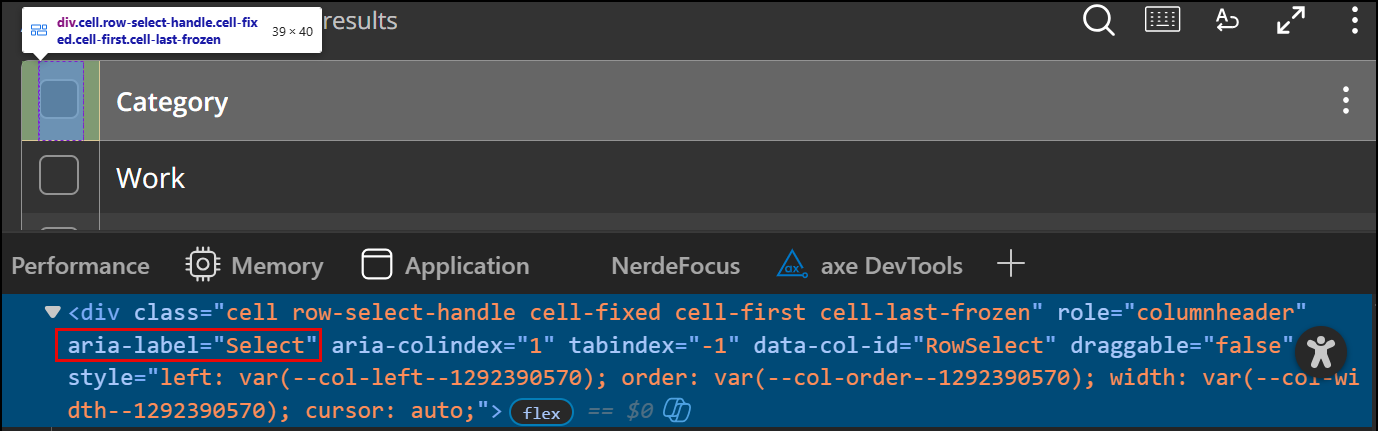
Visually, the checkbox in the header and the respective column cells explicitly reflect the purpose of the column. This is a common pattern encountered in operating systems’ file management systems and in many widely used file hosting and sharing sites. Coupled with the ability for application authors to specify whatever caption for a given table that best meets user and business needs, the available operations and functionality of tables should be clear for users who navigate in various ways.