
Question

Sveriges-A-Kassor
Sveriges-A-Kassor
SE
Sveriges-A-Kassor
Posted: Feb 28, 2023
Last activity: Feb 28, 2023
Last activity: 28 Feb 2023 10:48 EST
Closed
Upper function is added in report definition populated table
We are using a report definition to populate a table. When we filter the records from one of the column headers, Pega adds upper function like ( UPPER("WL"."pxAssignedUserName") LIKE @P167 ) .
It makes the filtering very slow. How can we avoid the upper function?
***Edited by Moderator: Pooja Gadige to add capability tag***
To see attachments, please log in.
Posted: 2 years ago
Updated: 2 years ago
Updated: 28 Feb 2023 6:45 EST

Bits In Glass
Bits In Glass
CA
Posted: 2 years ago
Sveriges-A-Kassor
Sveriges-A-Kassor
SE
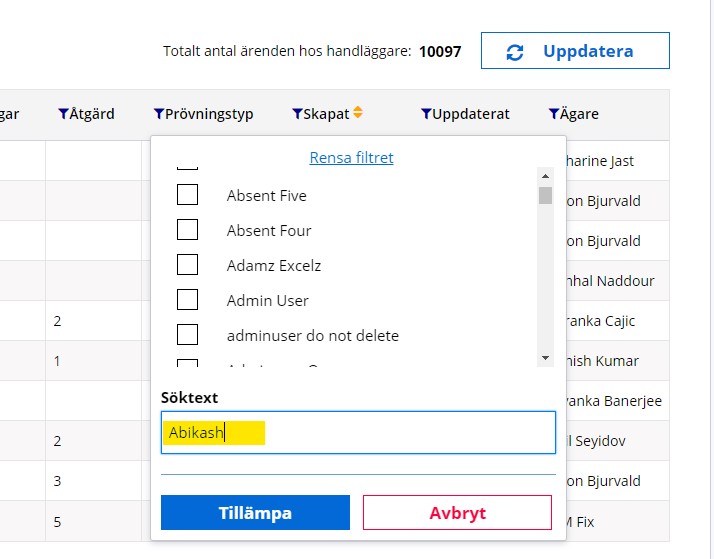
@Sumit KumarThe filter condition in not added in the report definition. Pega adds it dynamically in where clause of the query when we filter from table filter.
Posted: 2 years ago
Updated: 2 years ago
Updated: 28 Feb 2023 8:09 EST

PEGA
Pegasystems Inc.
IN
@AbikashKumarS16695091 Hi,
Please check if you have enabled "Ignore case" in your filter value, if you have enabled then pega adds UPPER to your query. Please uncheck that and check. It would solve your issue.
You can check this in option icon next to function icon near your filter value
@AbikashKumarS16695091
By default, Pega adds the UPPER function to string properties used in filter conditions to make the search case-insensitive. However, this can slow down the filtering process, especially when dealing with large amounts of data. To avoid the UPPER function, you can modify the filter condition to use a case-insensitive search operator instead.
For example, instead of using the "LIKE" operator, you can use the "CONTAINS (CI)" operator to perform a case-insensitive search. The resulting filter condition would look like this:
This will perform a case-insensitive search without the need for the UPPER function.
Alternatively, you can modify the report definition to use a custom SQL query that doesn't use the UPPER function. To do this, you can use the "Edit SQL" option in the report definition and modify the SQL query to remove the UPPER function.
Keep in mind that removing the UPPER function may make the search case-sensitive, which may not be desired in some cases. Also, it's important to thoroughly test any changes to the filtering process to ensure that they don't have any unintended side effects.