
Question

Customertimes
LV
Last activity: 27 Apr 2017 8:34 EDT
How to conditionally allow expand a row in expand pane from repeating grid
I have a repeat grid with master detail "expandable rows" type. Configuration below:
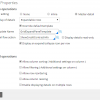
Business requirement is that when status property have one of allowed values, disallow to expand a row. For example, if status = closed (pre-last column), when user clicks an expand icon, nothing happens, or expand icon just disabled / not visible.
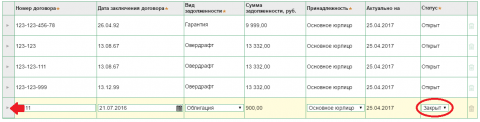
How can I accomplish desired behavior? It is possible for collapsible container for dynamic layout (with Expand when), but as I can see, there is no baseclass property like pyExpandable for grid row.
I tried to set pyExpanded on property status change (in action set), but it doesn't work for me, even if I set "Enable displaying details on multiple rows". Also I tried to customize pyPreGridUpdate and pyPostGridUpdate Activity with EDITITEM grid action. Finally, I can't found template for expandpane header, where I could set visibility condition for expand icon.
Accepted Solution

Pegasystems Inc.
IN
Customertimes
LV
Hello Rincy,
Thank you for your response!
As I wrote before, I already tried to set pyExpanded and it didn't help. About post under link I saw it before creating post on forum.
Finally, I referred to UI gallery again, and found Custom link implementation. It was useful, I added extra column with icon, visible on necessary conditions.
Best regards,
Alexander
Hello Alexander,
Thanks for posting your query in PSC :)
You may set the "pyExpanded" property to true, for whichever rows you want to expend. Refer Designer Studio >> UI Gallery >> Expand Pane >> Expand Multiple rows example. In the pre-activity of the flow action, you may conditionally set the above mentioned property to true(for all the required rows).
Also, refer the implementation for the Custom link. The expand/collapse icon is shown based on conditional check on pyExpanded, used on layout's visibility.
Verify if this post is helpful at your end.
Regards,
Rincy