
Question

Pegasystems Inc.
JP
Last activity: 10 Aug 2020 21:54 EDT
How to change required asterisk after label to some other text
Hi,
Below is the out-of-the-box required asterisk after label.

I want to change this asterisk to some other text in Pega Platform 8.3.1. Below is the sample image.

FYI, in 7x, you needed to edit css to add ".iconRequired" class as shown below. You could either add your own css file to the Harness, or you could also include the code in the "UserWorkForm".
.iconRequired:after{
content: "REQUIRED";
...
}
In 8.1 - 8.2, you could do this from skin - edit it as below.
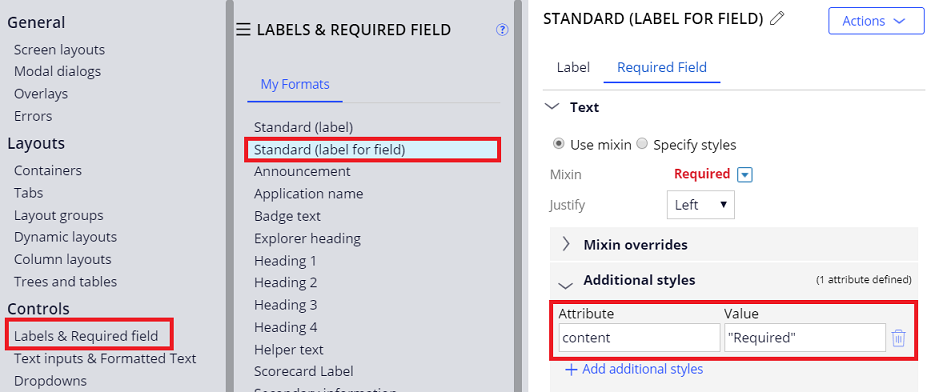
In 8.3.1, neither of above solution is not working for me. Has anything been changed in 8.3.1, or am I missing anything. Please let me know.
Thanks,
Accepted Solution
Updated: 10 Aug 2020 21:54 EDT
Pegasystems Inc.
JP

Pegasystems Inc.
FR
Hello,
Can this be helpful: https://collaborate.pega.com/question/update-icon-required-fields
Pegasystems Inc.
JP
No, as I wrote in my original post, I am trying to change the asterisk icon to other "text". not replacing the icon.
Updated: 14 Jun 2021 7:38 EDT
.
IN
I think we need to use custom CSS to achieve this, Please find the below URL.
https://collaborate.pega.com/question/customize-style-required-element
Accepted Solution
Updated: 10 Aug 2020 21:54 EDT
Pegasystems Inc.
JP
Let me update my solution. This is valid after 8.3.
Case 1. If you want to replace OOTB required icon with other icon, do the following:
(1) Override Rule-File-Binary "webwb • requiredstar • gif" to your ruleset. Upload your preferred image file.
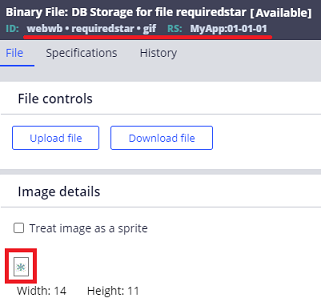
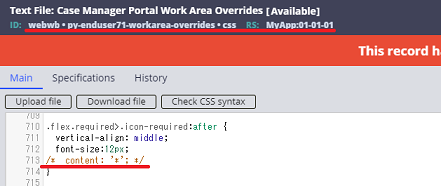
(2) Override Rule-File-Text "webwb • py-enduser71-workarea-overrides • css" to your ruleset. Comment out "content" attribute in the .icon-required:after {} as below.
Outcome:
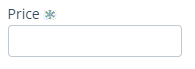
Case 2. If you want to replace required icon with Text, do the following:
(1) Override Skin rule and add "content" attribute with your preferred string (in this sample I made it "Required") as below.
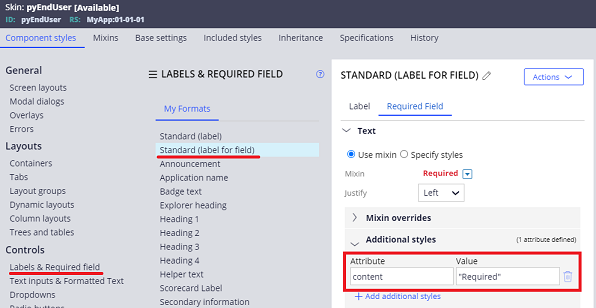
(2) Do the same step as Case 1-(2).
Let me update my solution. This is valid after 8.3.
Case 1. If you want to replace OOTB required icon with other icon, do the following:
(1) Override Rule-File-Binary "webwb • requiredstar • gif" to your ruleset. Upload your preferred image file.
(2) Override Rule-File-Text "webwb • py-enduser71-workarea-overrides • css" to your ruleset. Comment out "content" attribute in the .icon-required:after {} as below.
Outcome:
Case 2. If you want to replace required icon with Text, do the following:
(1) Override Skin rule and add "content" attribute with your preferred string (in this sample I made it "Required") as below.
(2) Do the same step as Case 1-(2).
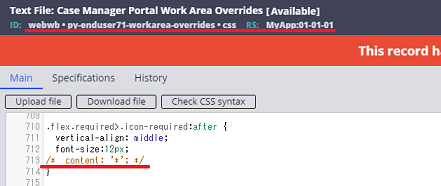
Outcome:
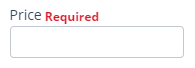
Thanks,
Let me update my solution. This is valid after 8.3.
Case 1. If you want to replace OOTB required icon with other icon, do the following:
(1) Override Rule-File-Binary "webwb • requiredstar • gif" to your ruleset. Upload your preferred image file.
(2) Override Rule-File-Text "webwb • py-enduser71-workarea-overrides • css" to your ruleset. Comment out "content" attribute in the .icon-required:after {} as below.
Outcome:
Case 2. If you want to replace required icon with Text, do the following:
(1) Override Skin rule and add "content" attribute with your preferred string (in this sample I made it "Required") as below.
(2) Do the same step as Case 1-(2).
Let me update my solution. This is valid after 8.3.
Case 1. If you want to replace OOTB required icon with other icon, do the following:
(1) Override Rule-File-Binary "webwb • requiredstar • gif" to your ruleset. Upload your preferred image file.
(2) Override Rule-File-Text "webwb • py-enduser71-workarea-overrides • css" to your ruleset. Comment out "content" attribute in the .icon-required:after {} as below.
Outcome:
Case 2. If you want to replace required icon with Text, do the following:
(1) Override Skin rule and add "content" attribute with your preferred string (in this sample I made it "Required") as below.
(2) Do the same step as Case 1-(2).
Outcome:
Thanks,