
Question
Export Data method - MS Excel component
How to pass the Cell start and cell end params when am not sure about the number of rows and number of columns in the excel sheet? Because this is mandatory for exporting the data of the excel sheet into a lookup table. How to process the data if we do not know the cell start and cell end param values?
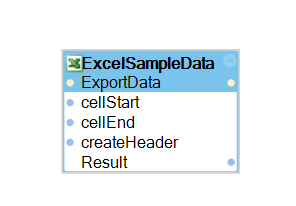
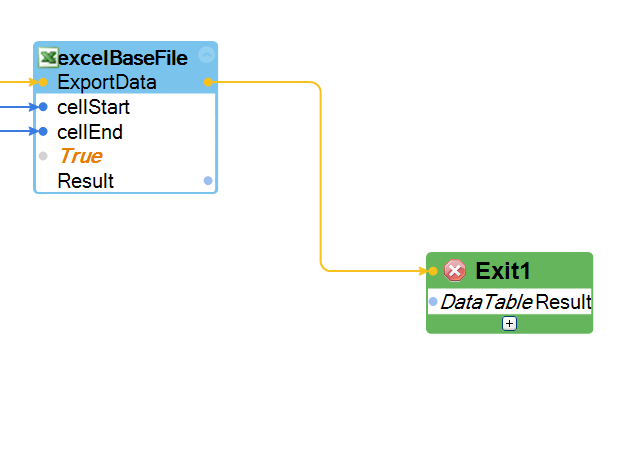
Also, unable to pass the result of an ExportData method to an exit shape with DataTable parameter. What am i missing here?
**Moderation Team has archived post**
How to pass the Cell start and cell end params when am not sure about the number of rows and number of columns in the excel sheet? Because this is mandatory for exporting the data of the excel sheet into a lookup table. How to process the data if we do not know the cell start and cell end param values?
Also, unable to pass the result of an ExportData method to an exit shape with DataTable parameter. What am i missing here?
**Moderation Team has archived post**
This post has been archived for educational purposes. Contents and links will no longer be updated. If you have the same/similar question, please write a new post.
Accepted Solution

Pegasystems Inc.
US

Areteans Technology Solutions
AU
The ExportData method gives result as a parameter which is of data type "System.Data" and NOT
"Microsoft.Office.Interop.Excel"
That was the missing piece of info for the second question.
Although the first question as to how can one find out the cell end row / column index before calling the export method still remains unanswered.
Thanks in advance.

Pegasystems Inc.
US
For question 1 you're probably going to need to use the expected design of your workbook to cycle through the page using GetCellValue until you locate the entry that isn't null (thus, where you want to start), and the last entry before the nulls begin again (where you want to end).
For question 2 the exit block might not be able to accept DataTable, you may have to manipulate the Excel connector's status as a global and access it that way.
http://help.openspan.com/80/Automations/Entry_and_Exit_Points.htm
Areteans Technology Solutions
AU
The Excel file that i am working on has around 30k rows. By the method that you suggested earlier, i might have to loop all the 30k rows just to get the index of the last row. Is this the only way to dynamically know the number of rows? Don't we have count variable that holds the row count?
Accepted Solution
Pegasystems Inc.
US
Excel does provide a used range that would get you at least farther than the end, however if you need the exact end, you need to loop through all rows. The Excel used range basically gets you the last cell that ever had something in it, so it might be way past the actual end. I have attached a screenshot of that automation though.
When I have done this in the past with a large number of rows, I create a series of nested loops to go through ever smaller increments. For 30k, I would create one loop that increments the row by 1000. When I get to one that is blank, I would go to another loop that starts 1000 less (or goes backwards, although backwards with the ForLoop component is tricky) and iterates by 100. When that reaches a blank row, then start 100 less and iterate by 1 as going through 99 rows won't take much time. This would mean that for 30,201 rows, you would have to check essentially five cells before you found the correct one.
Excel does provide a used range that would get you at least farther than the end, however if you need the exact end, you need to loop through all rows. The Excel used range basically gets you the last cell that ever had something in it, so it might be way past the actual end. I have attached a screenshot of that automation though.
When I have done this in the past with a large number of rows, I create a series of nested loops to go through ever smaller increments. For 30k, I would create one loop that increments the row by 1000. When I get to one that is blank, I would go to another loop that starts 1000 less (or goes backwards, although backwards with the ForLoop component is tricky) and iterates by 100. When that reaches a blank row, then start 100 less and iterate by 1 as going through 99 rows won't take much time. This would mean that for 30,201 rows, you would have to check essentially five cells before you found the correct one.