
Build manually option removed from New Application
Hi,
While creating a quick prototype in my Pega Community Edition, I noticed that the option to manually create a new application (“Build from scratch”) is no longer available.

I'm using Pega Infinity '25.1.1 in a community edition environment.
Although Blueprint is excellent for setting up industry-specific applications, the ability to build an application manually is very useful for rapid prototyping and creative thinking. I hope this option can be reinstated.
Thank you for considering this request.
Regards,
-Jose

Pegasystems Inc.
CA
This is intended. Pega expects to create the new application through Blueprint which offers several benefits (Speed up the development, necessary artifacts are created during the application creation, etc..).
Updated: 26 Dec 2025 12:20 EST

Blue Zone Consulting Partners
US
@RameshSangili Hi Ramesh,
I agree that Blueprint is an excellent starting point for creating new customer/client applications, as it provides a solid foundation and accelerates development. However, in my experience, having the “build manually” option can be very helpful for quick prototypes or POCs that don’t require full structure initially but can later be integrated into an existing application.
Think of it like using placeholder names such as “Foo” and “Bar” in programming—while not ideal for production, they enable experimentation and learning, which ultimately speeds up progress.
Thanks for your consideration.
Best regards,
-Jose

Softserve Inc
US
Dear Support Team,
I completely agree with the points raised by @josenavas. While the Pega Blueprint tool is an impressive leap forward for standardizing industry applications, removing the "Build manually" option feels like a significant step backward for developer autonomy, especially in the Community Edition.
Building on Jose's points, here is why we need to bring back the manual option:
-
The "Blank Canvas" Problem: Not every project is an industry-standard CRM or Service app. When we are building highly customized, niche utilities or innovative prototypes, the Blueprint process forces us into a predefined structure. It is far more efficient to build from a clean slate than to spend hours "deconstructing" or deleting GenAI-generated rules that don't fit our specific logic.
-
Learning the Core Architecture: For those of us using the Community Edition to sharpen our skills, the manual build is a critical "rite of passage." It allows us to understand the relationship between the Application, the Organization, and the Layer Cake. Blueprint abstracts this so much that new developers may lose touch with how the underlying rule structure is actually composed.
Dear Support Team,
I completely agree with the points raised by @josenavas. While the Pega Blueprint tool is an impressive leap forward for standardizing industry applications, removing the "Build manually" option feels like a significant step backward for developer autonomy, especially in the Community Edition.
Building on Jose's points, here is why we need to bring back the manual option:
-
The "Blank Canvas" Problem: Not every project is an industry-standard CRM or Service app. When we are building highly customized, niche utilities or innovative prototypes, the Blueprint process forces us into a predefined structure. It is far more efficient to build from a clean slate than to spend hours "deconstructing" or deleting GenAI-generated rules that don't fit our specific logic.
-
Learning the Core Architecture: For those of us using the Community Edition to sharpen our skills, the manual build is a critical "rite of passage." It allows us to understand the relationship between the Application, the Organization, and the Layer Cake. Blueprint abstracts this so much that new developers may lose touch with how the underlying rule structure is actually composed.
-
Friction in Rapid Prototyping: Sometimes we just need a quick sandbox to test a single UI component or a specific Data Transform. Having to navigate through the Blueprint portal, wait for the AI to generate a summary, and then import the file is a heavy workflow for a simple "Proof of Concept" that used to take 30 seconds to initialize manually.
-
Dependency Risks: Relying solely on an external AI service to create an application means that if there are connectivity issues or service outages with the Blueprint portal, our ability to start new work in our local environments is completely halted.
The "Build from scratch" option provided a level of flexibility and "under-the-hood" control that is essential for seasoned developers and curious learners alike.
I hope the Pega Product team considers reinstating this feature as an alternative to Blueprint, rather than replacing it entirely.
Regards,
Jigar Patel
Blue Zone Consulting Partners
US
@RameshSangili Hi Ramesh,
I hope this is my final note on this topic. I believe @JigarP has already explained very clearly why the “Build from scratch” option should be reinstated.
To add to that, I found a better way to illustrate why this capability is important –please correct me if I’ve missed a way to achieve this using Blueprint–. If you look at the current LSA application for MDC Delivery Service, it’s built on top of several other applications: Truck Service, Invoice, Delivery Request, and others. While each built‑on application could be created with Blueprint, I don’t see how we can construct the top-level implementation application (in this case, Delivery Service), which not only adds those built‑on apps but also bundles their case types into different rulesets.
Right now, without the build-from-scratch option, the only workaround I see is to create a Blueprint with a single placeholder case type (since Blueprint requires at least one), then spend time stripping out everything else to produce the lightest possible blueprint. After uploading it into Pega, we then need to adjust the app to match the intended architecture and application stack. As Jigar mentioned, this process can easily add unnecessary hours of Blueprint configuration and post-import cleanup.
@RameshSangili Hi Ramesh,
I hope this is my final note on this topic. I believe @JigarP has already explained very clearly why the “Build from scratch” option should be reinstated.
To add to that, I found a better way to illustrate why this capability is important –please correct me if I’ve missed a way to achieve this using Blueprint–. If you look at the current LSA application for MDC Delivery Service, it’s built on top of several other applications: Truck Service, Invoice, Delivery Request, and others. While each built‑on application could be created with Blueprint, I don’t see how we can construct the top-level implementation application (in this case, Delivery Service), which not only adds those built‑on apps but also bundles their case types into different rulesets.
Right now, without the build-from-scratch option, the only workaround I see is to create a Blueprint with a single placeholder case type (since Blueprint requires at least one), then spend time stripping out everything else to produce the lightest possible blueprint. After uploading it into Pega, we then need to adjust the app to match the intended architecture and application stack. As Jigar mentioned, this process can easily add unnecessary hours of Blueprint configuration and post-import cleanup.
Bringing back the Build from scratch option would enable experienced Pega developers and LSAs to configure implementation applications—especially those dependent on built‑on apps—much more quickly and efficiently.
I hope Pega can consider reinstating this option.
Regards,
Jose
Updated: 17 Jan 2026 11:20 EST
PerseusX Incorporated
MX
I agree with the feedback here regarding the Blueprint feature. I was looking to quickly build and test a proof of concept, and I must admit the absence of the Build from scratch option was frustrating.
I am sure most Pega developers would agree that the Build from scratch option should be readily available. It is the primary way many of us learn and experiment.
For future reference, I would like to share a quick workaround to display the Build from scratch button. It is a simple edit to a when condition: `pyShowBuildManually`.
First step:
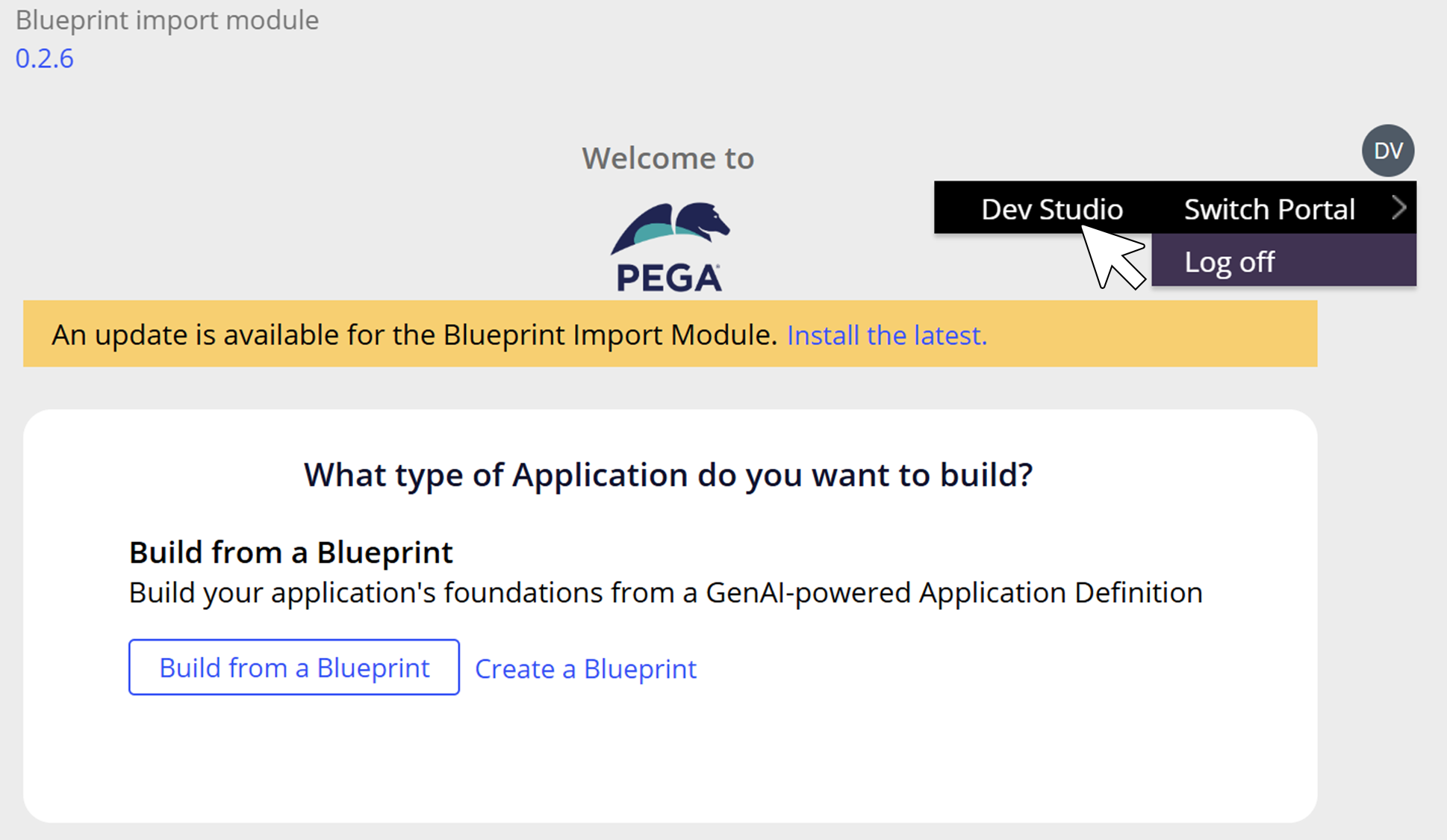
When you are in the Create Application wizard, use the top-right menu to switch to Dev Studio.
Second step:
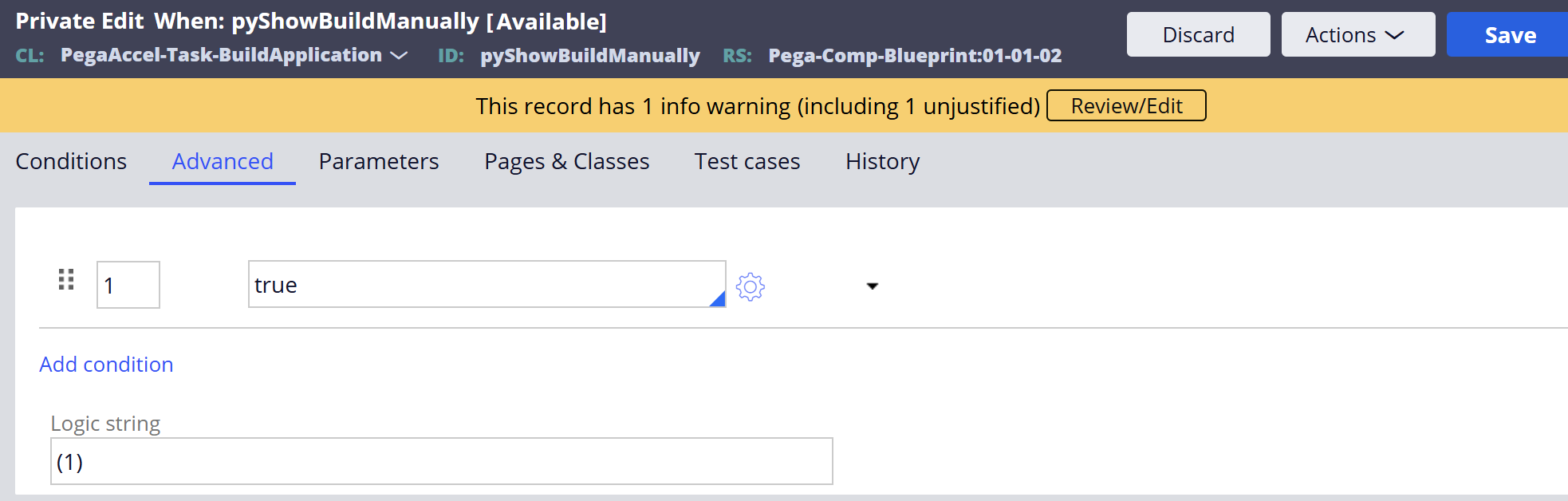
In Dev Studio, search for the `pyShowBuildManually` when condition. Create a private edit, set its value to `true`, and save.

I agree with the feedback here regarding the Blueprint feature. I was looking to quickly build and test a proof of concept, and I must admit the absence of the Build from scratch option was frustrating.
I am sure most Pega developers would agree that the Build from scratch option should be readily available. It is the primary way many of us learn and experiment.
For future reference, I would like to share a quick workaround to display the Build from scratch button. It is a simple edit to a when condition: `pyShowBuildManually`.
First step:
When you are in the Create Application wizard, use the top-right menu to switch to Dev Studio.
Second step:
In Dev Studio, search for the `pyShowBuildManually` when condition. Create a private edit, set its value to `true`, and save.
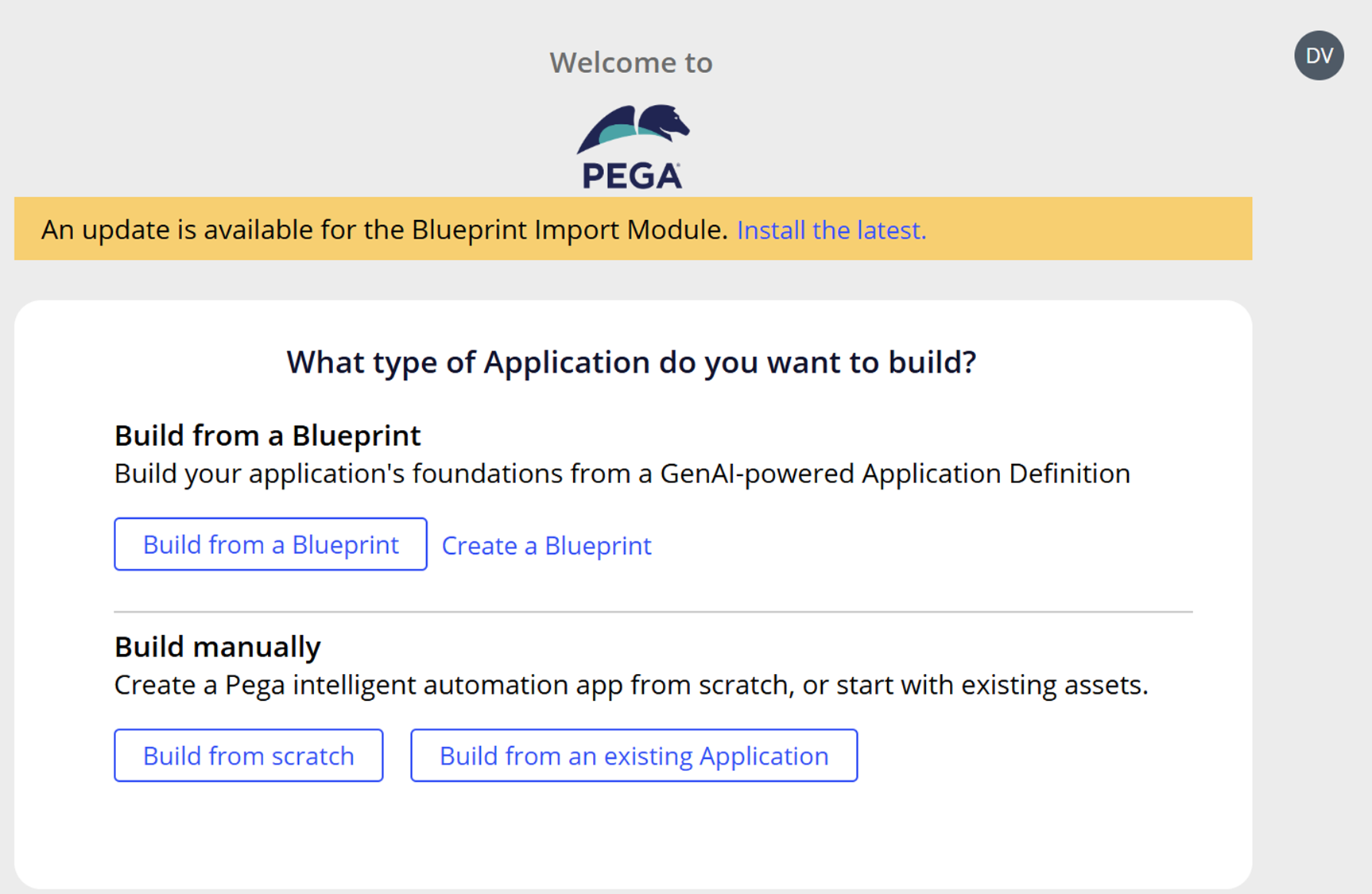
That’s it! When you return to the Create Application wizard, the Build from scratch option is available. =)
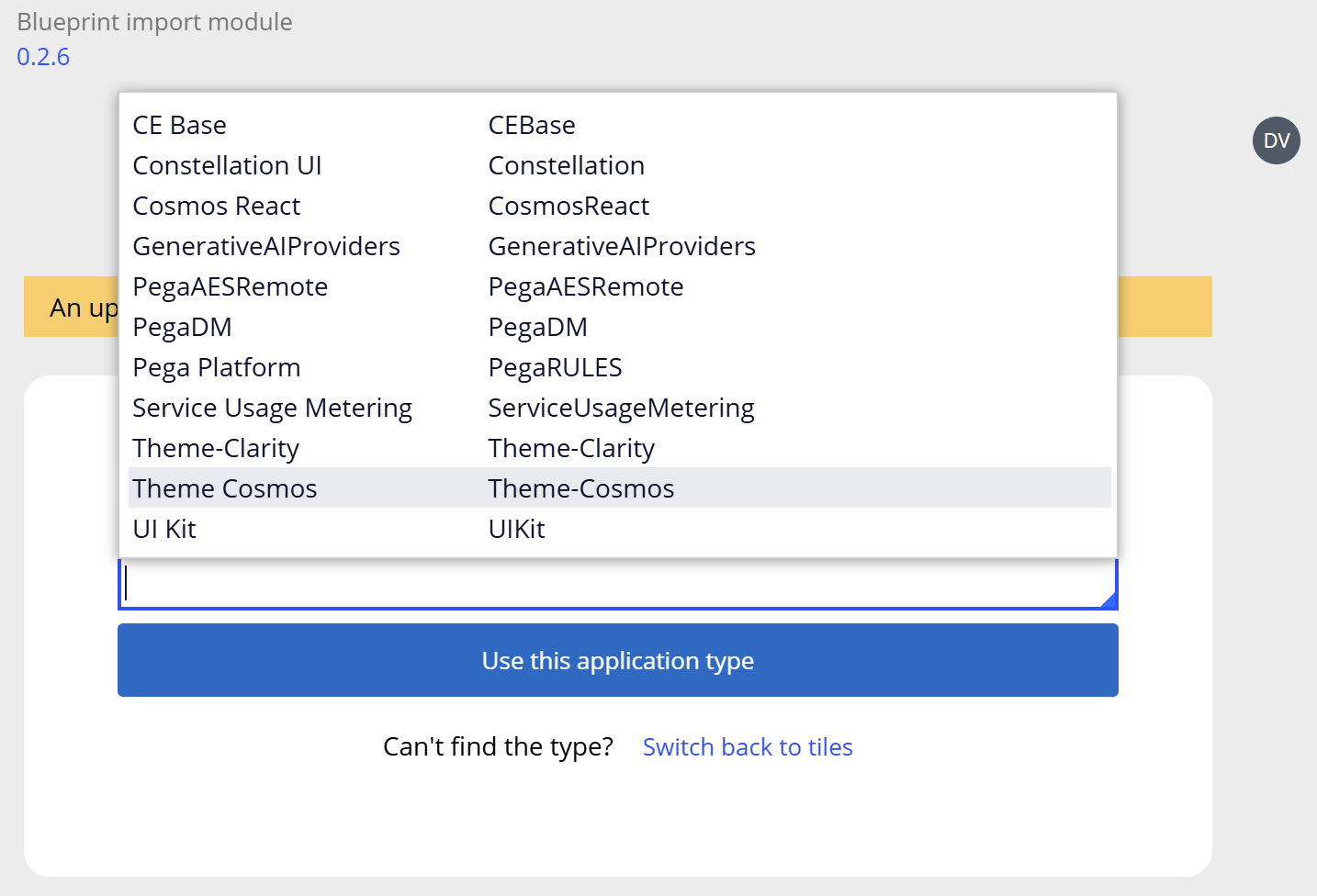
Just a heads up: Build from scratch automatically creates Constellation UI-based applications. If you want to use Theme Cosmos, select Build from an existing Application instead and search for it.
Hope this helps. Happy building!
Cognizant Technology Solution
IN
@DanielValenzuelaThanks alot I was also stucked here :)