

Issue
Auditing functionality does not operate as expected when TrackSecurityChanges is configured or enabled. For example, The functionality audits the unchanged property value from the previous audits.
Fields which are audited generate duplicate audits in the Audit history. The pyPreviousValues page does not refresh with the latest updated details on subsequent openings of the local action.
Symptoms and Impact
Incorrect audit data displays unchanged fields as updated. This leads to potential confusion in case data tracking.
Steps to reproduce
- Create a flow action capturing individual case fields (For example, Name, State, and City) Add the flow action as a local action. Mark the State and City fields as audited using the TrackSecurityChanges.
- Open the local action, change the State field value, and click Submit.
- Verify if the audit captures the change.
- Reopen the local action.
- Change the City field value. The State field is reaudited along with the City field, despite no changes to the State field.
Root Cause
This is an expected issue in Field Level Auditing with TrackSecurityChanges.
Solution
If your implementation is using TrackSecurityChanges, update your configuration to use the supported Pega Platform auditing mechanism.
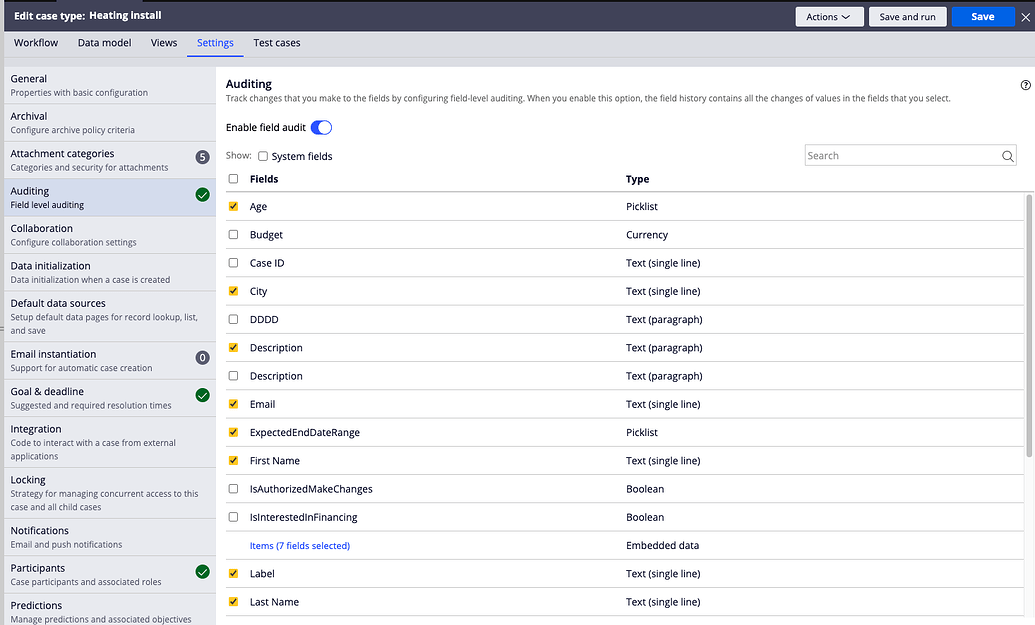
For field-level auditing of case data, use the built-in field audit feature in Infinity Studio (Settings > Auditing > Enable field audit).
The following screenshot illustrates how to enable Field level auditing in Case Designer:
For more information, refer the following articles: