

In this document, we will cover the following available Large Language Model:
- Azure OpenAI – GPT‑4 / GPT‑4‑class
- AWS Bedrock – Amazon Titan
- AWS Bedrock – Anthropic Claude
- Google Vertex AI – Gemini
- Other AWS Bedrock / Google Vertex Foundation Models
Introduction
Pega GenAI™ currently offers three conversational solutions, each with different strengths and characteristics: Pega GenAI Agent, Pega GenAI Coach and Pega GenAI Connect.
Out of the three features, GenAI Connect is the only one which does not use Data Pages as a source of information, which makes it suitable when broad input data is not required. By incorporating GenAI Connect Rules into their application, users can deliver context-aware assistance, automated content generation, and workflow-specific guidance tailored to their needs. Users can fine-tune prompts, map responses, run advanced tests, and process documents securely.
The AI Designer playground allows for real-time experimentation with prompt edits, model configurations, and response structures without saving changes, making it ideal for iterative development.
GenAI Connect Rules automate tasks such as summarizing Case details, generating documentation lists, and composing relevant emails. Supported media includes Text, PDF (via text extraction / document ingestion), Word (DOCX), Image (vision‑capable GPT‑4 variants) and Audio (via speech‑to‑text + GenAI orchestration).
Note: There is an open enhancement request that in future the GenAI connect rule will support attachment field references of Excel types so that extraction and analysis can be supported OOTB.
Best Practices for Model Selection
1. Familiarize yourself with existing LLM Provider-specific recommendations:
- Lightweight, high-volume: Claude-3-Haiku (Pega-Default-Fast)
- Complex reasoning: Claude Sonnet 3.7, GPT-4o
- Cost-sensitive: GPT-4o-mini, Gemini Flash 2
2. Match model to use case requirements:
- Document size/complexity
- Expected response structure
- Volume/throughput needs
Model Availability Constraints
- Available LLMs depend on:
- GenAI provider enabled for the tenant (AWS/Azure/GCP)
- Cloud region hosting
- Models certified by Pega for that provider/region
Note: GenAI Connect Rule in the Pega platform currently lacks support for connecting to custom AI models, forcing clients and partners to build complex integrations using data pages, REST connectors, and dynamic prompt configurations. There is an open enhancement request to provide native support for connecting to custom AI models in the near future.
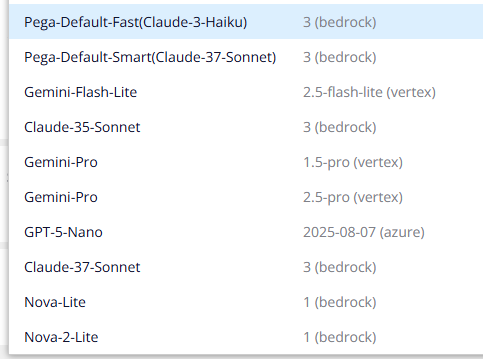
List of available LLM
Known Model Selection Issues
Be aware of the following when testing LLM's:
Runtime Model Binding Issue
The model configured in the GenAI Connect rule's Advanced tab → Model → GenAI model is locked at runtime. Changing the model in the Run window does NOT override the configured model during execution. Many incidents occur because users believe they have changed the model when they have not.
PDF-processing-specific Model limitations
- Gemini models: Experience timeout issues with large/multi-page PDFs
- Implement PDF splitting before GenAI Connect processing
A warning about large-document extraction
Users may occasionally find that when using the OOTB ExtractContentusingGenAI GenAI Connect rule (Pega's Document Processing (DocAI) feature, using Gemini 2.5 Flash Vertex), the data in pdf and docx is not completely extracted as confirmed when viewing the chunks. The reason for this may be that LLMs have output token limits, if we are trying to replicate the entire document, it is not a valid usecase.
Custom GenAI Connect rules are a much broader toolset for integrating LLMs into workflows. Their input is Case data and custom prompts rather than attachments, and they can handle a wide range of tasks: summarizing case details, generating emails, providing recommendations, drafting documentation, and so on. Developers have granular control over prompt engineering, model selection (GPT-4, Claude, etc.), temperature, and PII data masking.
Attachment extensions supported by Large Language Models
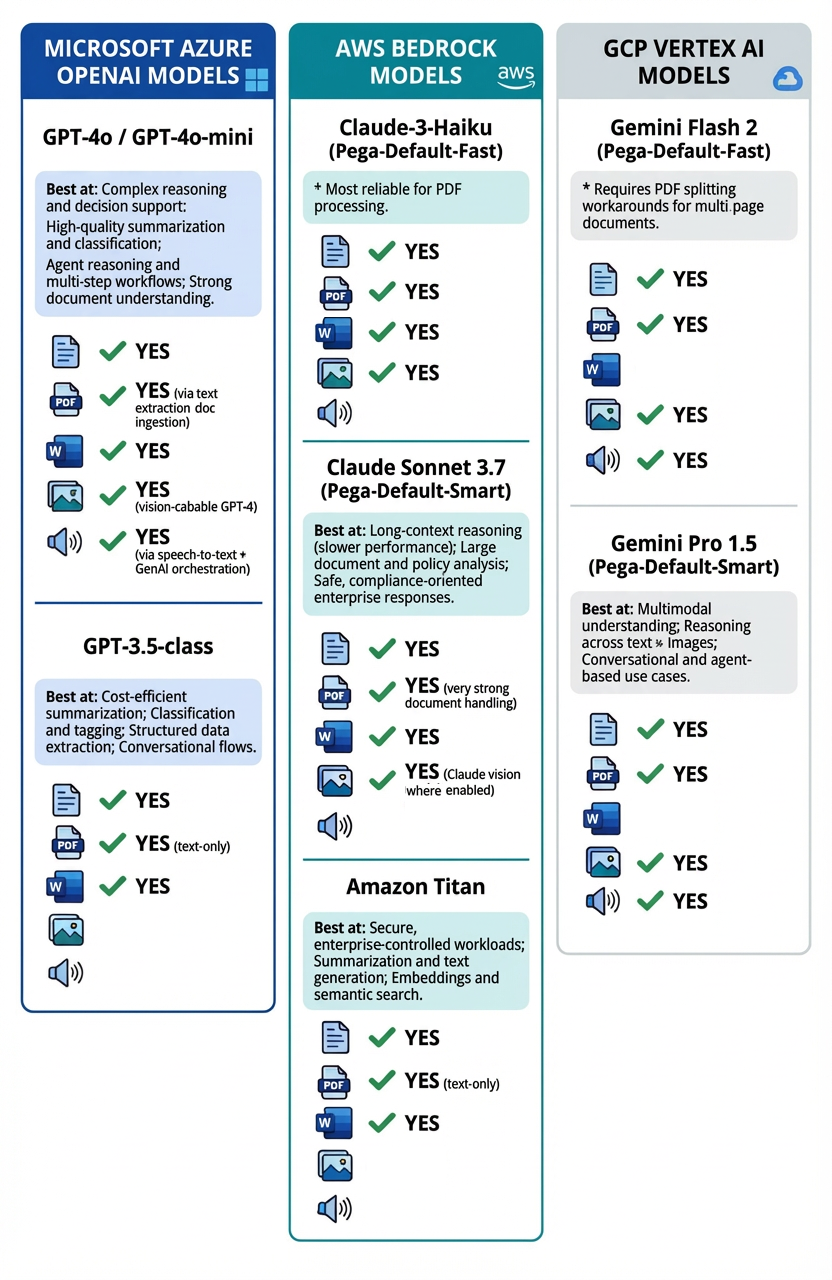
When deciding on which model to use based on case requirements you need to be aware that many of the models accept certain file extensions but may not deliver the expected results. To read check boxes, for example, you may find that rather than changing a prompt, you can use an LLM which has strong document handling, and which can accurately decipher checkboxes and visual items from a PDF Form.
Below is a list to help narrow down what model to use:
Azure OpenAI – GPT‑4 / GPT‑4‑class
- Best at
- Complex reasoning and decision support
- High‑quality summarization and classification
- Agent reasoning and multi‑step workflows
- Strong document understanding
- Attachment / Input types
- Text
- PDF (via text extraction / document ingestion)
- Word (DOCX)
- Image (vision‑capable GPT‑4 variants)
- Audio (via speech‑to‑text + GenAI orchestration)
AWS Bedrock – Amazon Titan
- Best at
- Cost‑efficient summarization
- Classification and tagging
- Structured data extraction
- Conversational flows
- Attachment / Input types
- Text
- PDF (text‑only)
- Word (DOCX)
AWS Bedrock – Anthropic Claude
- Best at
- Secure, enterprise‑controlled workloads
- Summarization and text generation
- Embeddings and semantic search
- Attachment / Input types
- Text
- PDF (text‑only)
- Word (DOCX)
- Image
We have had reports that users encountering failures switched to Pega-Default-Fast (Claude-3-Haiku) to resolve these issues.
Google Vertex AI – Gemini
- Best at
- Multimodal understanding
- Reasoning across text + images
- Conversational and agent‑based use cases
- Attachment / Input types
- Text
- Image
- Audio
Google Cloud Platform (GCP): Be particularly cautious with PDF size and complexity. There are known issues where Gemini models extract random content from docx files. While Gemini models can process a variety of document types, they only apply native vision and contextual understanding to PDF files. For other formats like .docx, the model essentially treats the content as plain text. This means that any formatting, charts, or images within the Word document will be lost during processing.
Other AWS Bedrock / Google Vertex Foundation Models
- Best at
- Use‑case‑specific tasks (summarization, embeddings, classification)
- Cost‑ or latency‑optimized workloads
- Attachment / Input types
- Text
- PDF *
- Word (DOCX) *
*Depends on the specific foundation model selected
For more information, see Model limitations for attachment support by Agents.
References
Using GenAI Connect in Case Management
Creating GenAI Connect Rules in AI Designer in App Studio
Configuring advanced GenAI Connect settings
Evaluating Pega GenAI Connect Rules in App Studio
Model limitations for attachment support by Agents
Document processing with Pega GenAI
Pega Predictable AI: 5 AI Placement Patterns
Document Analysis: Pega Doc AI vs. OCR + NLP
Pega to Expand GenAI Framework with Google Cloud & AWS, to Allow for Enterprise Generative AI Choice