
Enforce Dirty Check modal dialog with Save and Discard button for certain custom text input controls in Pega 24 env post upgrade
Problem statement-
Dirty Check modal dialog with Save and Discard button not appearing for certain text input controls in Pega 24 infinity upgraded env
Description-
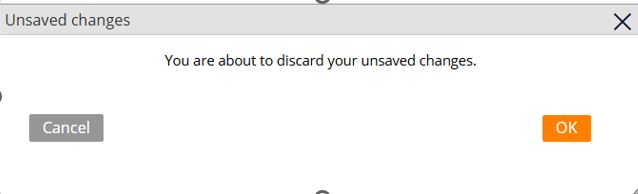
we upgraded from Pega 7 to Pega 24 Infinity recently, we noticed that for certain text input controls, we were seeing issue like if user modifies or deletes some information , and user tries to close the tab it doesnot shows the pop up which will say “You are about to discard your unsaved changes” as shown below
solution-
1. create a new javascript text file with below code
if(pega){
if(pega.u){
if(pega.u.d){
pega.u.d.attachOnload (function(){
pega.ui.HarnessContextMgr.set("gDirtyOverride",true);
}, true);
}
}
}
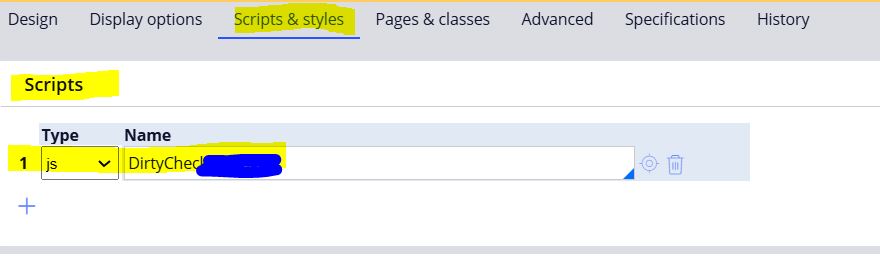
2. attach this javascript text file to Harness which holds the section which has those input fields like below

Pegasystems Inc.
GB

HCLTech
IN
@MarijeSchillern the corresponding scenario that I had mentioned is for HTML custom controls which are used as input control instead of OOTB pxinput , post upgrade we had noticed it is not working and doing post value as you had mentioned. The fix addresses one stop solution for all the custom HTML controls which might not be possible to be converted to OOTB for this dirty check.
@LondheGS many thanks for your Developer Knowledge Share. Your scenario details behaviour when actions are used at the input control level, on moving out of the property, the values are posted in the clipboard. According to the Pega Product, once values are posted to the clipboard, they are no longer dirty.
Similarly in scenarios when we have the current case editing and clicking on create case from the left menu, dirty dialog is not displayed. This is an expected behavior since the context is different and the form dirty will stay in the previous context only. Since create is opening in modal window this is a different context and dirty check will not be displayed here.
As per some requirements, to showcase dirty check for server interactions, the user can apply a documented workaround . In order to make the dirty check display for post value see the workaround as documented.
Set the pega.u.d.handleDirtyForFramelessPortals flag to true in the userworform.
I have added this simply to point users to the available main documentation:
Configuring confirmation modal dialog boxes
There is a very good support document which lists all possible scenarios:
Dirty Dialog - Troubleshooting