
Limit file size per attachment category
We have a client requirement to limit attachment size per category. We've evaluated the DSS that handles file size and trying to change it per category also modifying some OOTB features to support this somehow, but it is not as dynamic as we need it to be.
We are considering alternatives such as evaluating the size of the file either once it is uploaded or from the CallVirusCheck activity and building validations from there, but we would like Pega's suggestions to achieve this in a simple manner without customizing OOTB rules or compromising performance.
We've seen support entries related to evaluating file size on upload for our alternatives but Pega has removed the content recommended, for example https://support.pega.com/question/how-get-attachments-file-size
Thanks.
Accepted Solution
Updated: 11 Jun 2024 6:08 EDT

Vodafone DE
DE

Pegasystems Inc.
GB
@DaliaP16 I'm not sure what you mean when you state that ".. Pega has removed the content recommended.." on the articles quoted. The links quoted by Arun_Mahanty are indeed removed - likely due to the large time gap since they were posted.
The most up-to-date documentation is our support document:
How to restrict File Attachments by file type [SDR-94]
File upload and download troubleshooting FAQs
The latest functionality in Pega '24:

Rulesware
MX
@MarijeSchillern thanks Marije, yes I meant that the hyperlinks inside the referenced articles in my post were no longer valid and are taking us to "Content Not Found" pages indeed, so thank you very much for sharing the most up to date documentation on this matter, this helps us validate our approach.
Kind Regards!
Accepted Solution
Updated: 11 Jun 2024 6:08 EDT
Vodafone DE
DE
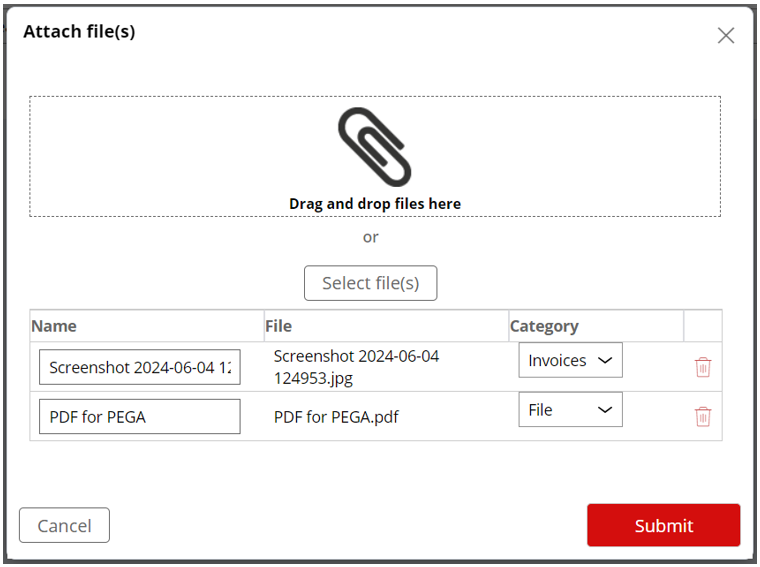
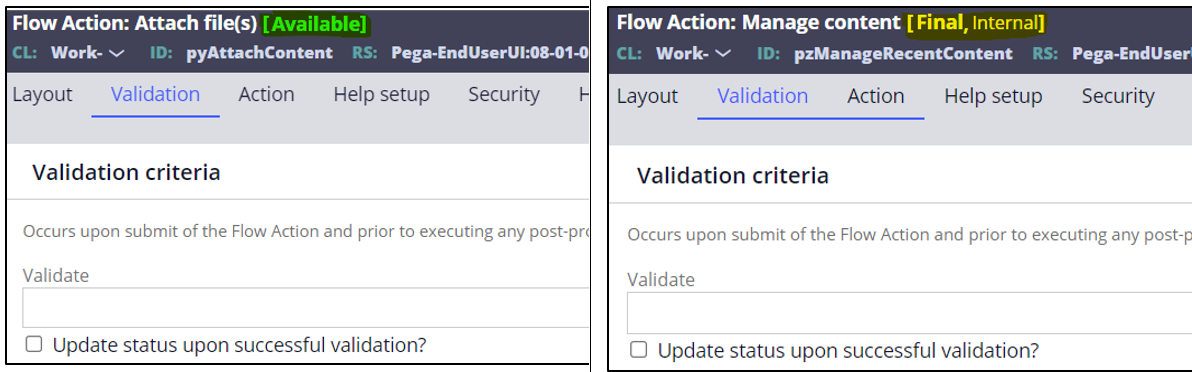
Assuming you are using Cosmos Traditional UI (things might be a lot different if you are using Constellation) and any of the following controls for the Upload and selection of categories:
Attach content control
Manage recent content control
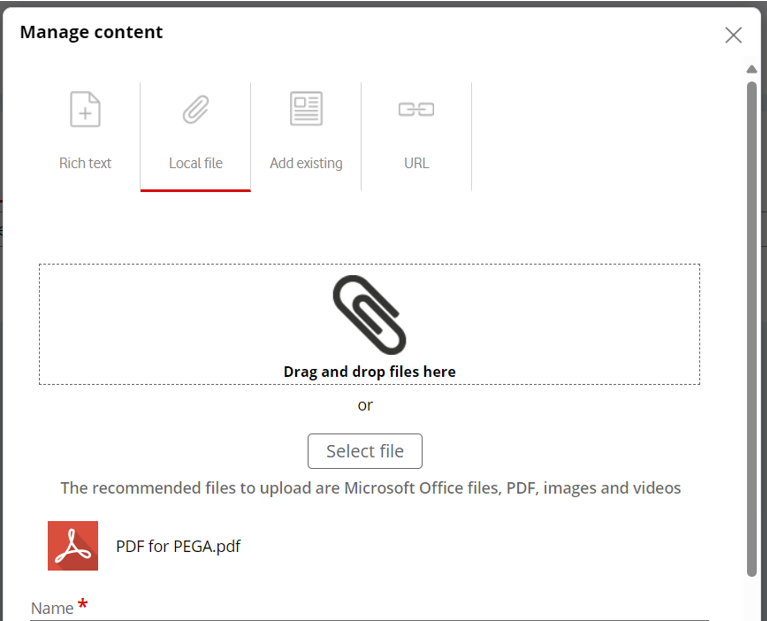
Every time you upload a file (by selecting from the dialog or Drag and Drop) and before you submit the dialog, the Page dragDropFileUpload will be available on the Thread, you could build an RUF (as described on the first link of your original post) to calculate the file size and then Validate according to your business needs.
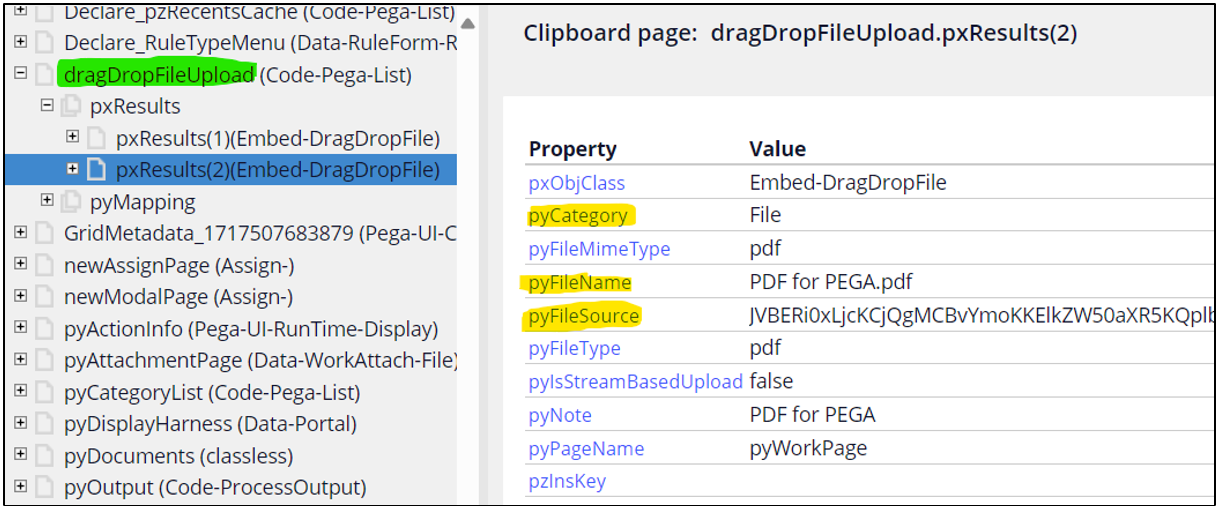
Remember that Cosmos uses 2 threads when working on Work Objects, so you might need to switch between them to find the correct page.
Assuming you are using Cosmos Traditional UI (things might be a lot different if you are using Constellation) and any of the following controls for the Upload and selection of categories:
Attach content control
Manage recent content control
Every time you upload a file (by selecting from the dialog or Drag and Drop) and before you submit the dialog, the Page dragDropFileUpload will be available on the Thread, you could build an RUF (as described on the first link of your original post) to calculate the file size and then Validate according to your business needs.
Remember that Cosmos uses 2 threads when working on Work Objects, so you might need to switch between them to find the correct page.
@DaliaP16
Assuming you are using Cosmos Traditional UI (things might be a lot different if you are using Constellation) and any of the following controls for the Upload and selection of categories:
Attach content control
Manage recent content control
Every time you upload a file (by selecting from the dialog or Drag and Drop) and before you submit the dialog, the Page dragDropFileUpload will be available on the Thread, you could build an RUF (as described on the first link of your original post) to calculate the file size and then Validate according to your business needs.
Remember that Cosmos uses 2 threads when working on Work Objects, so you might need to switch between them to find the correct page.
@DaliaP16
Assuming you are using Cosmos Traditional UI (things might be a lot different if you are using Constellation) and any of the following controls for the Upload and selection of categories:
Attach content control
Manage recent content control
Every time you upload a file (by selecting from the dialog or Drag and Drop) and before you submit the dialog, the Page dragDropFileUpload will be available on the Thread, you could build an RUF (as described on the first link of your original post) to calculate the file size and then Validate according to your business needs.
Remember that Cosmos uses 2 threads when working on Work Objects, so you might need to switch between them to find the correct page.