
Question

Pegasystems Inc.
JP
Last activity: 17 Dec 2020 13:38 EST
How to change the maximum file size for attachments
Hi,
In Pega 8x, below interface is provided for user to attach a file to a case. You can either (1) drag and drop files, or (2) specify files from "Select file" button.
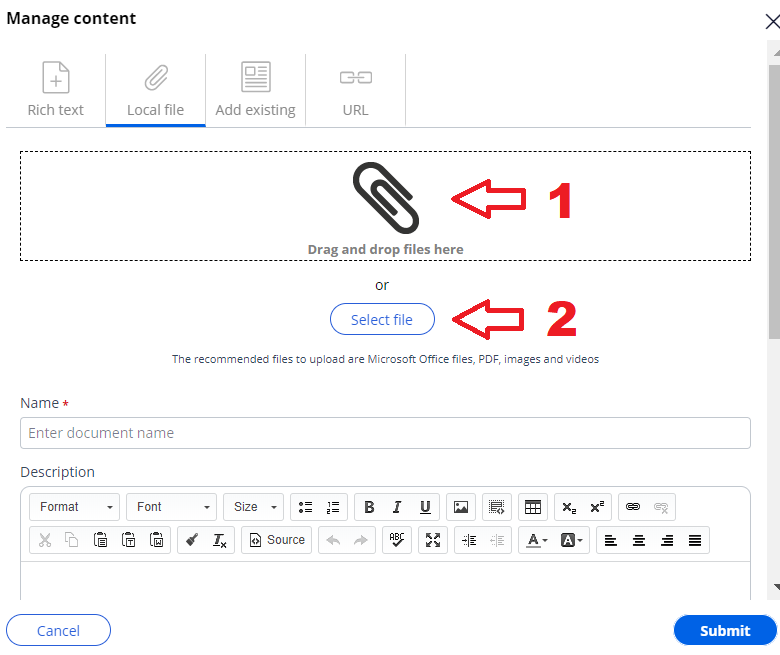
I want to change the maximum file size. By default, the maximum file size for above two approaches are different.
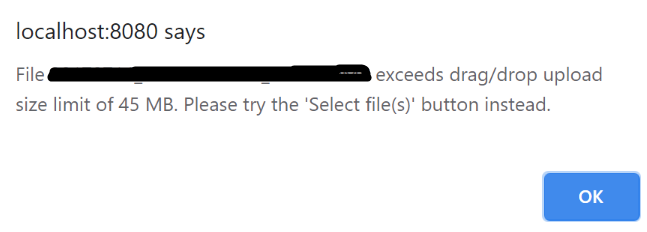
(1) Drag and drop: The maximum file size is 45MB as below picture shows.
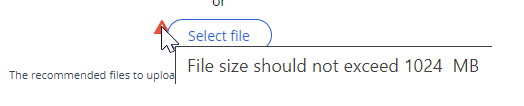
(2) Select files: The maximum file size is 1024MB as below picture shows.
The same interface for the same purpose has two different specifications.
Per my research, I have figured how to change (2), by updating either System Settings (rule instance) or Dynamic System Settings (data instance). Here is how to do it.
(2) - 1. System Settings approach (pyMaxDragDropAttachSizeMB):
Hi,
In Pega 8x, below interface is provided for user to attach a file to a case. You can either (1) drag and drop files, or (2) specify files from "Select file" button.
I want to change the maximum file size. By default, the maximum file size for above two approaches are different.
(1) Drag and drop: The maximum file size is 45MB as below picture shows.
(2) Select files: The maximum file size is 1024MB as below picture shows.
The same interface for the same purpose has two different specifications.
Per my research, I have figured how to change (2), by updating either System Settings (rule instance) or Dynamic System Settings (data instance). Here is how to do it.
(2) - 1. System Settings approach (pyMaxDragDropAttachSizeMB):
Find below rule instance and override it to your ruleset. Change the value per your production level.
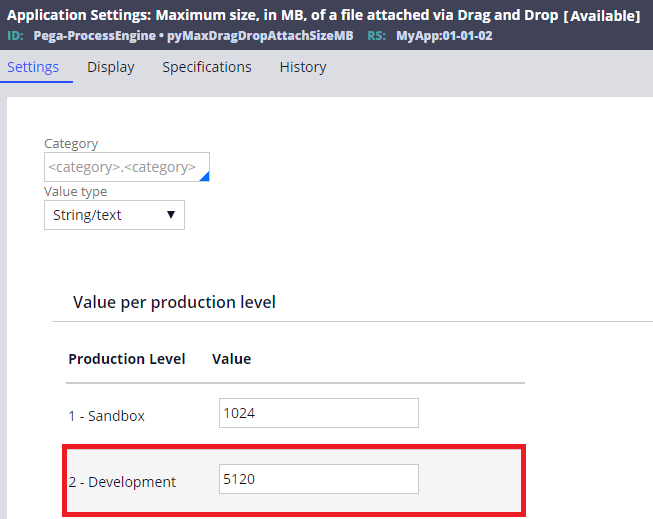
(2) - 2. Dynamic System Settings approach (prconfig/Initialization/MaximumFileUploadSizeMB/default):
Create a new DSS named "prconfig/Initialization/MaximumFileUploadSizeMB/default" with Owning ruleset "Pega-Engine". Set file size in the value.
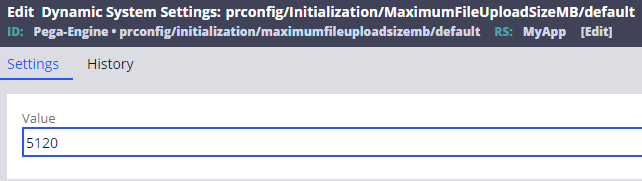
Both above approaches work for (2) "Select file" button interface (DSS has precedence over System Settings). However, still these approaches won't affect (1) drag and drop maximum file size. So my question is how to change this guy.
FYI, I have located a control rule named "pzMultiDragDropControlStandard" as below. This rule is not auto-generated Java based control. I could find the default value, 45MB as below, and it worked when I changed this by private check out, but this rule is FINAL. That means I am not supposed to override it.
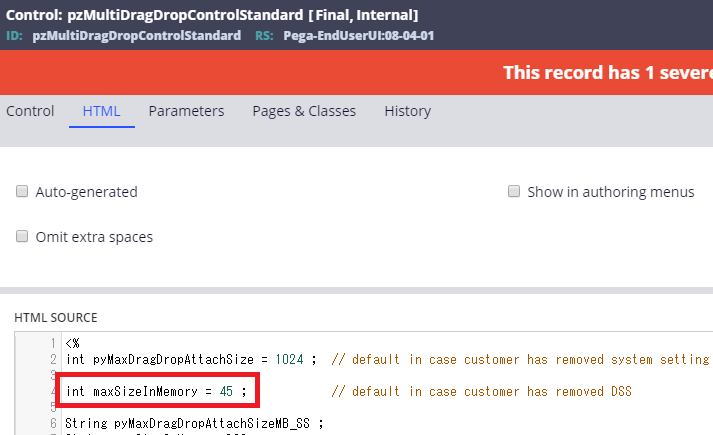
What is the easiest way to change this value?
Thanks,
***Edited by Moderator Marissa to update Platform Capability tags****
Accepted Solution
Updated: 1 Dec 2020 2:46 EST
Pegasystems Inc.
JP

BNZ
NZ
I have configured the same in Application settings, and was able to control the attachment size for both scenarios by updating Application settings at 1 place.Have attached screenshot for reference. Can you try to save the settings specific to your Application Ruleset and try.
BNZ
NZ
I have not tried configuring DSS for this scenario,used System settings because the variable will not be changed , we wanted it to be locked always which is catered by using System settings as it is a Rule instance,while DSS is a Data-Instance which can be changed although i do remember reading somewhere that DSS takes precedence over System settings, your scenario will be a good use case to test.
Thanks
Accepted Solution
Updated: 1 Dec 2020 2:46 EST
Pegasystems Inc.
JP
Here is an update. You don't need to use above DSS "prconfig/Initialization/MaximumFileUploadSizeMB/default". Instead, there is another DSS, "repository/maxFileSizeInMemory" and you can accomplish any file size requirement using SS, and this DSS.
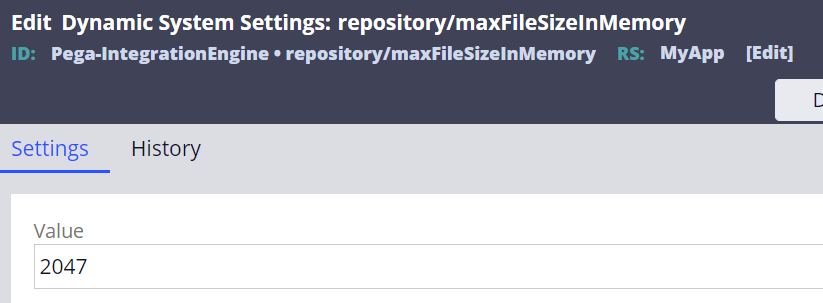
To conclude, if you want to set maximum file size for both "Drag & Drop" and "Select file button" to be the same value,
AND if you want to set them all lower than 45MB, you can accomplish this by using only SS ("pyMaxDragDropAttachSizeMB").
OR if you want to set them all higher than 45MB and lower than 1GB, you should use DSS ("repository/maxFileSizeInMemory") and SS ("pyMaxDragDropAttachSizeMB").
OR if you want to set them all higher than 1GB and lower than 2047MB (maximum size), you should also use DSS ("prconfig/initialization/maximumfileuploadsizemb/default") first to unlimit the 1GB restriction, and then use DSS ("repository/maxFileSizeInMemory") and SS ("pyMaxDragDropAttachSizeMB").
Here is an update. You don't need to use above DSS "prconfig/Initialization/MaximumFileUploadSizeMB/default". Instead, there is another DSS, "repository/maxFileSizeInMemory" and you can accomplish any file size requirement using SS, and this DSS.
To conclude, if you want to set maximum file size for both "Drag & Drop" and "Select file button" to be the same value,
AND if you want to set them all lower than 45MB, you can accomplish this by using only SS ("pyMaxDragDropAttachSizeMB").
OR if you want to set them all higher than 45MB and lower than 1GB, you should use DSS ("repository/maxFileSizeInMemory") and SS ("pyMaxDragDropAttachSizeMB").
OR if you want to set them all higher than 1GB and lower than 2047MB (maximum size), you should also use DSS ("prconfig/initialization/maximumfileuploadsizemb/default") first to unlimit the 1GB restriction, and then use DSS ("repository/maxFileSizeInMemory") and SS ("pyMaxDragDropAttachSizeMB").
- "prconfig/initialization/maximumfileuploadsizemb/default" DSS:
- This is not specific to file attachments from UI but for files upload to app server in general. This DSS does not exist as out-of-the-box, and you need to create it if needed. Reboot is required when you change the value. When this DSS does not exist, system limits any files upload to 1GB (implicit default).
- The maximum value you can set in this DSS is 2047MB. You can save it with higher value, but system will actually overwrite it by 1GB at runtime.

Hope this helps.
Thanks,
* @MarissaRogers, can we raise an enhancement request for this? Request is to simplify all these specifications.

Cognizant
IN
@TSUCK
Trying to increase the memory size for D_pxGetFile, to 100 MB
I referred below article, to increase the file size. which says to use repository/maxFileSizeInMemory dynamic system setting in the Pega-IntegrationEngine ruleset.
I used it but it didn't work for me. do we need environment restart after the DSS change.
https://community.pega.com/knowledgebase/articles/data-management-and-integration/84/repository-apis
I have elaborated my query here. Any help will be appreciated
Here is an update. You don't need to use above DSS "prconfig/Initialization/MaximumFileUploadSizeMB/default". Instead, there is another DSS, "repository/maxFileSizeInMemory" and you can accomplish any file size requirement using SS, and this DSS.
To conclude, if you want to set maximum file size for both "Drag & Drop" and "Select file button" to be the same value,
AND if you want to set them all lower than 45MB, you can accomplish this by using only SS ("pyMaxDragDropAttachSizeMB").
OR if you want to set them all higher than 45MB and lower than 1GB, you should use DSS ("repository/maxFileSizeInMemory") and SS ("pyMaxDragDropAttachSizeMB").
OR if you want to set them all higher than 1GB and lower than 2047MB (maximum size), you should also use DSS ("prconfig/initialization/maximumfileuploadsizemb/default") first to unlimit the 1GB restriction, and then use DSS ("repository/maxFileSizeInMemory") and SS ("pyMaxDragDropAttachSizeMB").
Here is an update. You don't need to use above DSS "prconfig/Initialization/MaximumFileUploadSizeMB/default". Instead, there is another DSS, "repository/maxFileSizeInMemory" and you can accomplish any file size requirement using SS, and this DSS.
To conclude, if you want to set maximum file size for both "Drag & Drop" and "Select file button" to be the same value,
AND if you want to set them all lower than 45MB, you can accomplish this by using only SS ("pyMaxDragDropAttachSizeMB").
OR if you want to set them all higher than 45MB and lower than 1GB, you should use DSS ("repository/maxFileSizeInMemory") and SS ("pyMaxDragDropAttachSizeMB").
OR if you want to set them all higher than 1GB and lower than 2047MB (maximum size), you should also use DSS ("prconfig/initialization/maximumfileuploadsizemb/default") first to unlimit the 1GB restriction, and then use DSS ("repository/maxFileSizeInMemory") and SS ("pyMaxDragDropAttachSizeMB").
Hope this helps.
Thanks,
* @MarissaRogers, can we raise an enhancement request for this? Request is to simplify all these specifications.