
Paragraph and blank space when no value present
Hello All
I have a paragraph rule where following properties are referenced in the below fashion
<<.AddressLine1>>
<<.AddressLine2>>
<<.AddressLine3>>
<<.City>>, <<.State>>, <<.Zip>>
The value for .AdressLine3 and AddressLine2 could be blank some times. When that propertty is null, system is introducing a blank line(s) between AddressLine1 and City,State,Zip.
Anything we can do to make the system not do that.
Appreciate all the help
***Edited by Moderator Marissa to update platform capability tags****
Accepted Solution

Pegasystems Inc.
IN

Pegasystems Inc.
IN
Please paste the below code in userworkform and let me know the outcome.
<style>
br + br { display:none; }
</style>
Centene Corporation
US
Didn't work :(
Just FYI, this paragraph rule is in section which in turn is referenced in html for HTMLtoPDF activity
Pegasystems Inc.
IN
Hi @AbhinayC,
Please try adding the below code in the Userworkform and let us know the result of the same.
<script>
$('br').each(function () {
if ($(this).next().is('br')) {
$(this).next().remove();
}
});
</script>
Hope this helps.
Regards,
Nandhadeepa
Centene Corporation
US
Didn't work :(
Just FYI, this paragraph rule is in section which in turn is referenced in html for HTMLtoPDF activity
Pegasystems Inc.
US
Hi AbhinayC
Not sure what version of Pega you are on.
Take a look at these posts and see if they are helpful for your version
https://community.pega.com/support/support-articles/htmltopdf-converts-pdf-extra-line-spaces
https://community.pega.com/support/support-articles/paragraph-issue
Thanks
Accepted Solution
Pegasystems Inc.
IN
Hey AbhinayC,
I tried and I am able to make it. Please follow below steps.
So you have paragraph rule like I show below.

When you display it shows like as shown below (IN PDF also same)

To remove the space for the properties which does not have values,
1) Use a condition when rule to display the property. i.e
Click on the magnifier icon of the property in paragraph rule, (on move hover you see that)
Hey AbhinayC,
I tried and I am able to make it. Please follow below steps.
So you have paragraph rule like I show below.
When you display it shows like as shown below (IN PDF also same)
To remove the space for the properties which does not have values,
1) Use a condition when rule to display the property. i.e
Click on the magnifier icon of the property in paragraph rule, (on move hover you see that)

Once you click on the magnifier, you would see the following modal dialog, In the modal dialog, configure a when rule, I configured "PropEmpty"

PropEmpty when rule configuration is,

Repeat the step for all the properties those would go empty at runtime and you dont want to see the space reserve for them in the PDF or UI
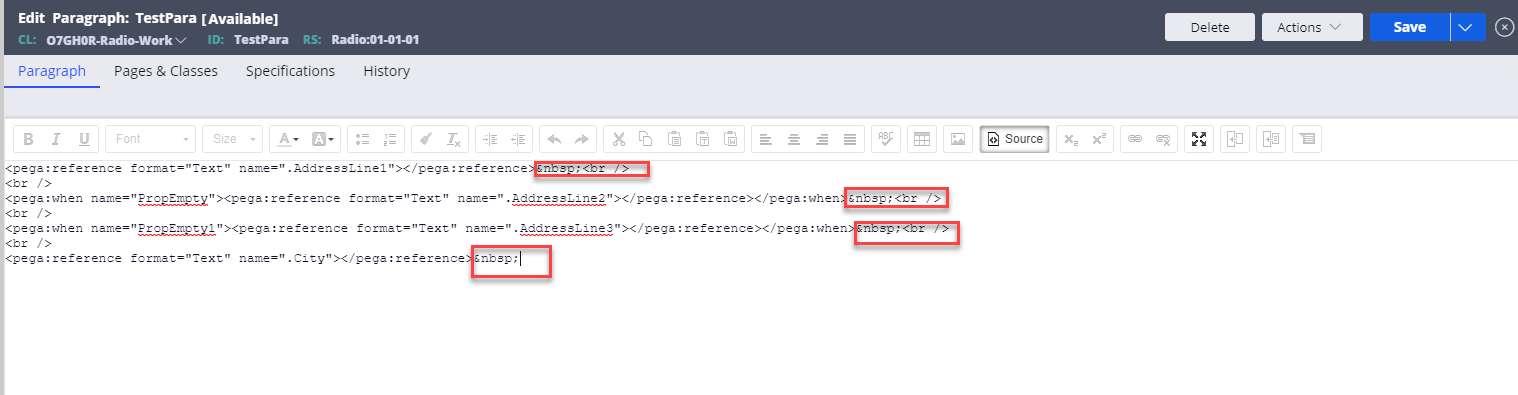
2) Now, Go to paragraph rule, Click source. you see as shown below

Remove the following red highlighted content from the source
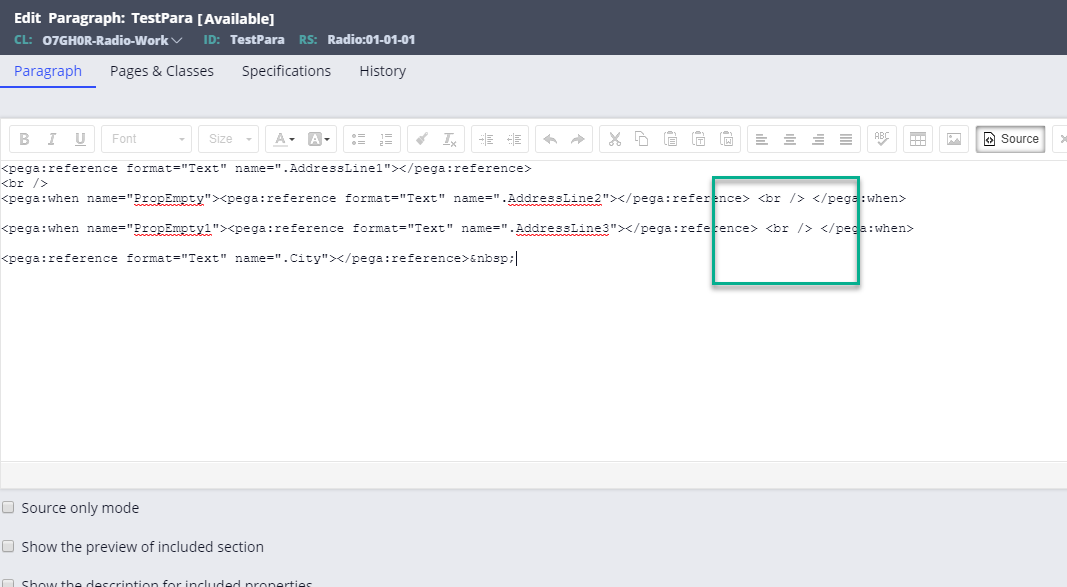
Now, Please move the <br/> tags to inside of when rule for the only properties configured with When rule, as shown below, this is the final code
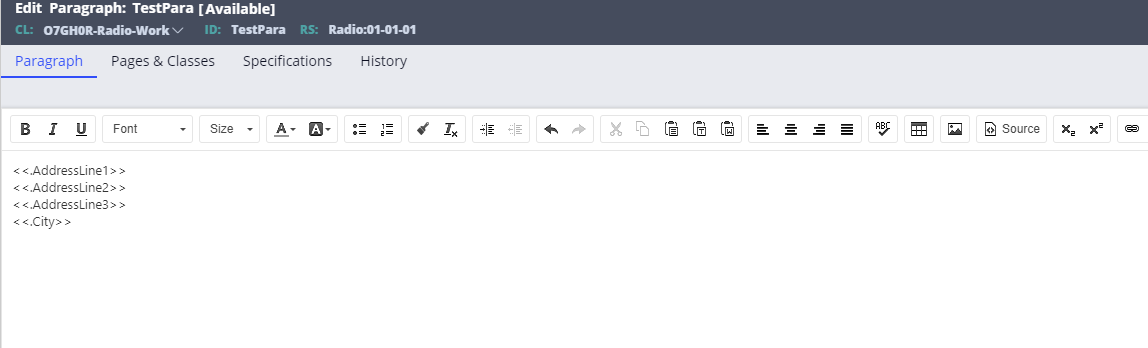
Trunoff source mode (Click again on "Source" button), look like below
Save all the rules modified and run the scenario,

If I've the value in Addressline2 then it will look like

Thats it !! As you are generating the PDF out of the section, whatever you see in the section, same is posted to PDF. So, The same solution works for both PDF and UI
In case, you dont see the expected out come, Please revisit
a) Your paragraph source editing
b) When rules of the properties are properly configured and true when values are empty.
Please feel free to reply for any questions.
Thank you,
Regards, Cherb.
Centene Corporation
US
Thank you. This worked
Pegasystems Inc.
IN
Glad ! You're very welcome !!
Hey AbhinayC,
I tried and I am able to make it. Please follow below steps.
So you have paragraph rule like I show below.
When you display it shows like as shown below (IN PDF also same)
To remove the space for the properties which does not have values,
1) Use a condition when rule to display the property. i.e
Click on the magnifier icon of the property in paragraph rule, (on move hover you see that)
Hey AbhinayC,
I tried and I am able to make it. Please follow below steps.
So you have paragraph rule like I show below.
When you display it shows like as shown below (IN PDF also same)
To remove the space for the properties which does not have values,
1) Use a condition when rule to display the property. i.e
Click on the magnifier icon of the property in paragraph rule, (on move hover you see that)
Once you click on the magnifier, you would see the following modal dialog, In the modal dialog, configure a when rule, I configured "PropEmpty"
PropEmpty when rule configuration is,
Repeat the step for all the properties those would go empty at runtime and you dont want to see the space reserve for them in the PDF or UI
2) Now, Go to paragraph rule, Click source. you see as shown below
Remove the following red highlighted content from the source
Now, Please move the <br/> tags to inside of when rule for the only properties configured with When rule, as shown below, this is the final code
Trunoff source mode (Click again on "Source" button), look like below
Save all the rules modified and run the scenario,
If I've the value in Addressline2 then it will look like
Thats it !! As you are generating the PDF out of the section, whatever you see in the section, same is posted to PDF. So, The same solution works for both PDF and UI
In case, you dont see the expected out come, Please revisit
a) Your paragraph source editing
b) When rules of the properties are properly configured and true when values are empty.
Please feel free to reply for any questions.
Thank you,
Regards, Cherb.