
Question

Infosys
IN
Last activity: 16 Oct 2018 12:03 EDT
convert a word document to pdf format
Hi Team,
My requirement is to convert a word document and save it as a pdf file format in the particular location on the desktop drive automatically. How to specify the format while using SaveAs method of microsoft word connector.
There should not be any user interaction in between the process.
Could you please help me out how to achieve this in Pega robotics studio
Regards,
Jyothi
**Moderation Team has archived post**
This post has been archived for educational purposes. Contents and links will no longer be updated. If you have the same/similar question, please write a new post.
Accepted Solution

Pegasystems Inc.
US
Infosys
IN
Thankyou Jeff, It is working as expected.
Anheuser-Busch Inc
US
What does this "Missing" script look like in the updated scripts constructs?
Pegasystems Inc.
US
It looks the same ...
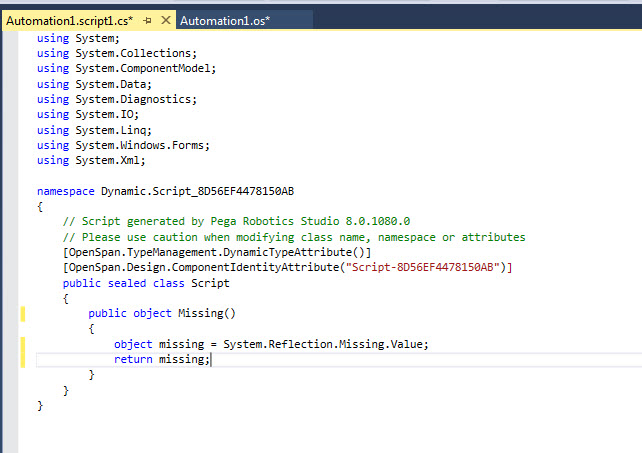
To do this you need to write a small script to generate an object with a System.Reflection.Missing.Value object. Here is what that looks like:
Now you can write your automation. Extract a proxy from the WordDocument property of the connector. This proxy will have a SaveAs2 method which you will use. Create a jump label that has a parameter of type Microsoft.Office.Interop.Word.wdSaveFormat. Then construct the following automation.
Obviously the button and opening the Word document are there just for my testing - you can trigger this how you would like. Just make sure you have the Word doc open.