

Issue
In Pega Knowledge™ release 25.1.1, the legacy UI Kit Knowledge Management (KM) widget sends duplicate requests when Knowledge Buddy is used to answer questions.
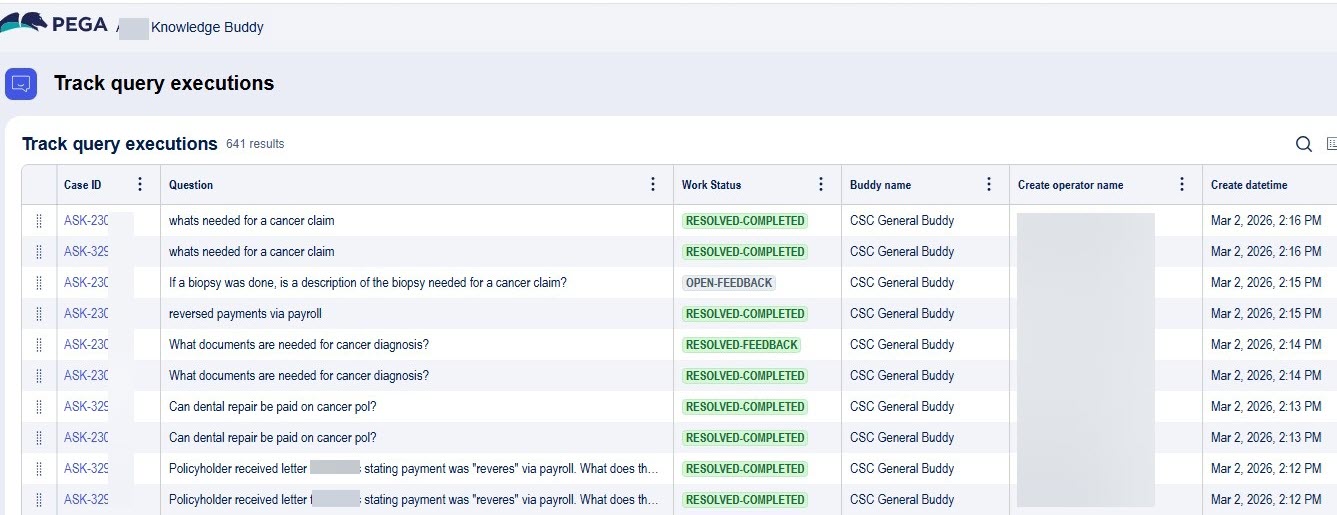
Approximately 70% of queries generate two separate Case IDs, which can be seen in the Track Query Executions report.
The duplication increases service call volume and may degrade performance in production environments.
This behavior is specific to the legacy UI Kit KM widget. The Constellation KM component is not affected.
Symptoms and Impact
After deploying the KM widget in a production environment and enabling Knowledge Buddy, the following behavior is displayed:
- In the Track Query Executions report, each user's question is listed twice, each entry with a distinct Case ID.
- Approximately 70% of Knowledge Buddy requests are duplicated.
- Service call volume is higher than expected, which can degrade response times under load.
The issue does not reproduce in development environments that use the Constellation KM component, or that have significantly lower query volume.
Steps to Reproduce
- Open an application that uses the legacy UI Kit KM widget with Knowledge Buddy enabled.
- Submit a question through the Knowledge Buddy interface.
- In Dev Studio, open the Track Query Executions report. This displays a list of Case IDs that the system creates when users submit questions.
- Verify that the question is listed twice, each entry with a different Case ID.
Root Cause
The legacy UI Kit KM widget contains a known defect that causes it to submit each Knowledge Buddy request twice.
This behavior is not present in the Constellation KM component.
The legacy widget receives no further enhancements, and the defect will not be resolved in the UI Kit codebase.
Solution
Migrate to the Constellation KM component. The duplicate-request behavior is not present in the Constellation component.
As part of this migration, the following additional configuration steps are required that are not fully documented in the current official guide:
- Open the KM_OAuth_EndUser record and enable Authorization Code in the supported grant types. Add the required redirect URLs.
- Embed KMWebEmbedGadget into the InteractionPortalRightPaneWrapper section, even if the gadget is already referenced in a dynamic layout elsewhere in the section. Confirm that the When condition on the section is met and that the relevant feature toggle is enabled.
- Update the Content Security Policy to allow the Constellation component origins.
References
Setting up authentication and adding the component in UI Kit
Troubleshooting Knowledge component issues
Knowledge component feature comparison in Constellation and UI Kit