
How to Save Repeating Grid from Clipboard into Data Explorer
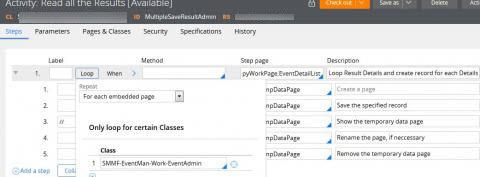
Hi, I'm new to PEGA. I have a problem of using repeating-grid-layout to list all the added items from clipboard, saving all of them into the data in PEGA. I'm using activity to loop and save, also already tracer that activity which only have 2 sequence; activity begins and activity ends. It seems that in the first step of activity there's a mistake. So here's my step:
Please CMIIW, first: I'm using loop For Each Embedded Page, the embedded page is my class path Case (SMMF-EventMan-Work-EventAdmin).
Secondly, the step page when looping is a PageList which contains the clipboard data.
Third, I want it to loop for all the details data in clipboard (ex: if there's .pxResults(5) then it will loop 5 times according to results)
After testing the case, there's neither errors information display nor the data is being saved in Class-Data. I wonder if my approach is wrong, or if there's another way to save Page List? (FYI: I'm using 7.2.1)
Thanks.
***Updated by Moderator: Marissa to remove secure information from image***
Accepted Solution
Updated: 3 Nov 2016 23:09 EDT

Sinarmas Multifinance
ID
Updated: 17 Oct 2016 16:47 EDT
Pegasystems Inc.
FR
Hello,
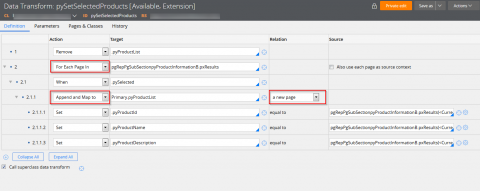
I'm not really sure to understand what you are trying to achieve with your Activity, but you could try with a Data Transform instead maybe. See the following existing one:
***Updated by Moderator: Marissa to remove secure information from image***
Sinarmas Multifinance
ID
Hello LASSM, thanks for your fast reply. I want to save a multiple data on PageList so i'm using Activity to loop method Obj-Save. For saving a single page, there's no issue at all with the activity. For example, I have many contact list (firstName, lastName, phone, address, etc) and after inputing all in the repeating-grid-layout, the contact list data is now within the clipboard page and I want to save it to database in PEGA.
I've already thought of using DataTransform to save, but to save or browse PEGA can only use activity or java function. (Using obj-methods). Also while I try to use DataTransform, PEGA couldn't use local variables.
Pegasystems Inc.
FR
Well,
If you just need to save yes, the Obj-Save on pyWorkPage should be sufficient, you might need a Commit as well depending on the context. Can you attach a screen shot of your activity, on your previous screen shot I can only see the loop been configured.
Sinarmas Multifinance
ID
Yes, here's the screenshot.

After I run my case and input data in repeating grid, they only stored in clipboard page.
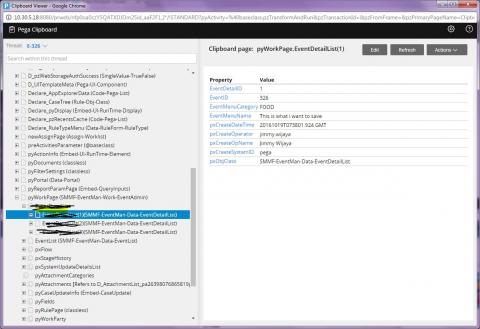
How do I save it to the database PEGA?
Thanks
Accepted Solution
Updated: 3 Nov 2016 23:09 EDT
Sinarmas Multifinance
ID
It is already resolved. Thank you.
I just need to loop repeat "For Each Element Value List" in the step which using property-set method. (I mention earlier that I'm using Activity)
Then inside property-set method, I used pyWorkPage.MyPageList(<CURRENT>).MyPropertyPageList for the properties value input. After that I add child step and set the method obj-save.
This is the syntax that I missed out : "(<CURRENT>)"
It is already resolved. Thank you.
I just need to loop repeat "For Each Element Value List" in the step which using property-set method. (I mention earlier that I'm using Activity)
Then inside property-set method, I used pyWorkPage.MyPageList(<CURRENT>).MyPropertyPageList for the properties value input. After that I add child step and set the method obj-save.
This is the syntax that I missed out : "(<CURRENT>)"