
How to display static text in a Pega Constellation view?
I'm working with Pega Constellation and need to display a piece of static text in a view.
For example, I want to show a message like:
"Your country is USA"
What’s the best way to add static or read-only text to a Constellation view?
Ideally, I'm looking for something similar to a label, paragraph, or a read-only field.

HCA Healthcare
US
In Constellation, the simplest way is to add a Text content block in the view: open the view in App Studio, click Add, choose Text, type Your country is USA, and save; it renders as read-only content. If you want it styled like body copy or a label, set the Text style (Body, Caption, Helper) in the block’s settings. For dynamic bits, use a small expression: Your country is {.Country} and keep the block read-only so users can’t edit it. If you prefer a property, create a calculated single-value property like .CountryMessage with the expression "Your country is " + .Country and drop it in the view with Display mode Read-only. For multi-line notes, use the Rich text content block and disable editing. To support translation, store the sentence as a Field Value (or Message) and reference it in the Text block so locales swap it automatically. You can also add helper text on a field for short hints, but Text/Rich text is best for standalone messages.

Evonsys
NL
@Sairohith , when we open the view either in App or Dev studio, we have options only to add either fields or views. No such option to choose as Text.


HCL Technologies Ltd
IN
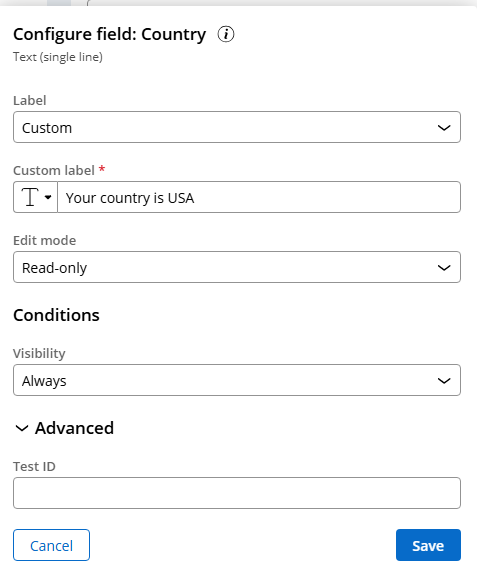
Hi @AchinthaJ,
This is the simplest way if you just want to display a fixed message.
Steps:
-
In your View, click Add Field.
-
Choose Text (Single-line text).
-
Set the Value to your static message — for example:Your country is USA
-
Under Display Mode, choose Read-only.
- The field will appear as plain text on the screen, without being editable
Regards,
Mohd Qizer Uddin
Evonsys
NL
@Mohd Qizer Uddin , this approach will show an uneditable field below the label/text, but that shouldn't be the case. I only need to display a plain text in the UI.

HCL Technologies Ltd
IN
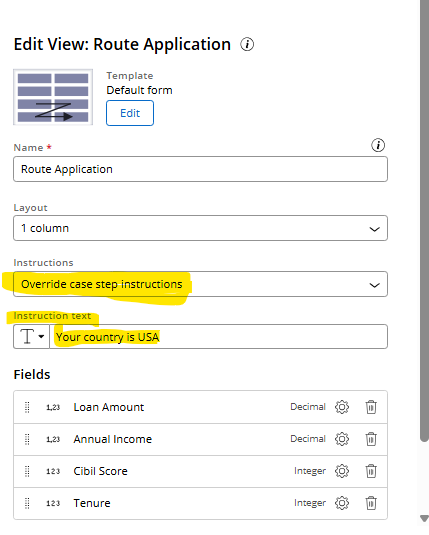
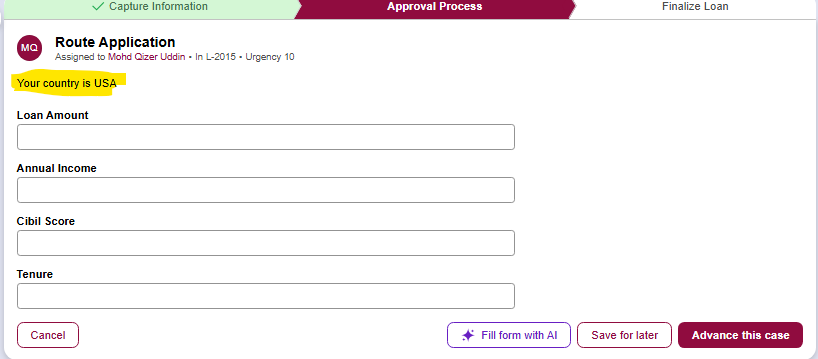
Evonsys
NL
@Mohd Qizer Uddin , the view instruction always appears at the top of the UI, but that shouldn't be the case. I require that when a user selects a specific value from a dropdown field, for example, 'USA' from a country dropdown, a static text should be displayed just below that dropdown field, not on top of the UI like the view instructions.
The Bank of Nova Scotia Trust Company
CA
@Mohd Qizer Uddin have you figured it out the answer you your question if yes kindly reply .

Pegasystems Inc.
CA
If you're in 25.1 version, then use DynamicText to populate the static text.
The Bank of Nova Scotia Trust Company
CA
@RameshSangiliits about 24.1, how to acheive it their.

Booz Allen
US
@adityak7979 @AchinthaJ Hi, did you ever figure out? Even in 25 most suggestions are not helpful
Booz Allen
US
@adityak7979 but doesnb't that only appear under a field?