
Question

Evonsys
LK
Last activity: 2 Sep 2022 8:39 EDT
How can I display upcoming year date and month according to the current year date and month as the default value..
I have a date only property, In that property I want to display the current date + 1 year as the default value How can I achieve that ? (I want to add another year to the current date and display it as the default value in the property. More like expire date )
example -
Current date - 08/31/2022
Date want to display - 08/31/2023
***Edited by Moderator Marije to add Capability tags***
Accepted Solution
Evonsys
LK

Bentego
TR
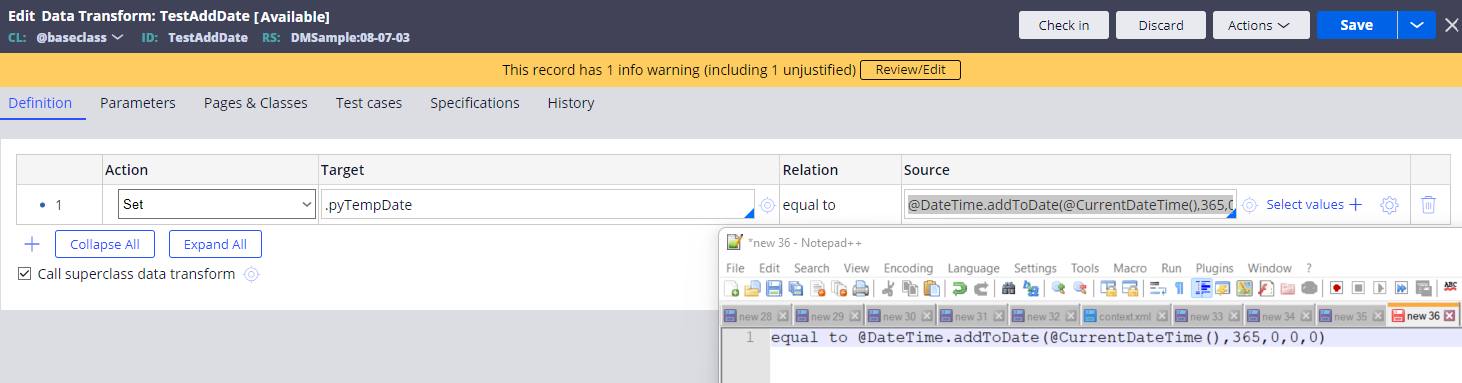
You may use addToDate function and set return value to Date property like example below.
Deloitte
US
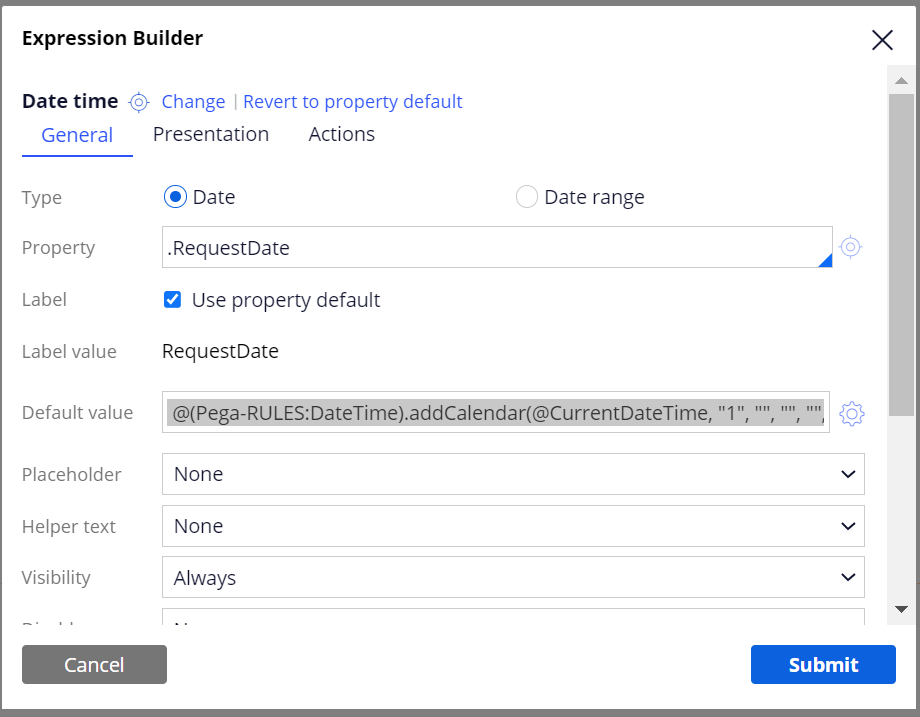
You can set it in the DateTime control (as below). This will ensure to set the property only from a particular flow action in UI and not set/save the property value in background before processing the assignment.
@(Pega-RULES:DateTime).addCalendar(@CurrentDateTime, "1", "", "", "", "", "", "")
Evonsys
LK
@Gowtham Allu I configure the settings on the cell properties like this but it give me an error message. But I manage to fix that. Thanks.
Updated: 1 Sep 2022 17:38 EDT

TSPi
US
@AshinaShanuka , if you use the below code in default value of property you can do the modification also.
@(Pega-RULES:DateTime).addCalendar(@CurrentDateTime, "1", "", "", "", "", "", "")
if it is read only property and depends on any manufacture date then use this on data transform. Replace current date time with manufacture date.
Accepted Solution
Evonsys
LK
@AshinaS2
Thank you everyone for replying, I found the solution.
First you have to open the cell properties and then click the cog mark in front of the default value field. And then select the DateTime as the library and select the addCalendar as the function. After that fill the parameters using positive or negative number based on your need (Like in the bottom of the below Image) . After that click insert button to insert the parameter values. (Using positive number you can display future dates and using negative numbers you can display past dates as for default values) .
I want to display the current date + 1 year as the default value, so this is what I used -
@(Pega-RULES:DateTime).addCalendar(@CurrentDateTime(), 1, 0, 0, 0, 0, 0, 0)

@AshinaS2
Thank you everyone for replying, I found the solution.
First you have to open the cell properties and then click the cog mark in front of the default value field. And then select the DateTime as the library and select the addCalendar as the function. After that fill the parameters using positive or negative number based on your need (Like in the bottom of the below Image) . After that click insert button to insert the parameter values. (Using positive number you can display future dates and using negative numbers you can display past dates as for default values) .
I want to display the current date + 1 year as the default value, so this is what I used -