
Error when launching the VirturalBox: Host Only Ethernet Adapter
For the Pega self study Marketing training I try to launch the Exercise system with VirturalBox. I used this instruction to install and configure all elements: http://pegasystems2.http.internapcdn.net/pegasystems2/marketing/C-xxx-Marketing_Exercise_System_Guide_713.pdf
When Launching the Marketing Enablement 7.13 ML9 file, the following error is displayed:
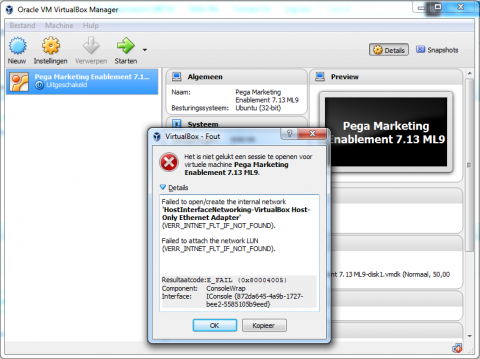
I tried the possible solution as described in this thread: https://forums.virtualbox.org/viewtopic.php?f=6&t=68590&start=450#p345379 . But it is already turned on, and changes do not have an effect.
Do you have any other suggestions how to fix this problem?
***Updated by moderator: Lochan to move the post from PSC to Pega Academy community***
Accepted Solution

Pegasystems Inc.
NL
Pegasystems Inc.
NL
Hi
Thank you for your post.
Please go through the following post, and the post referenced inside that. Together, both those posts cover the most common issues and resolutions for the Marketing and Decisionining exercise system.
https://collaborate.pega.com/question/unable-start-pega-virtual-network-my-mac-machine
Regards
Guru

Atos Consulting
NL
Dear Deshg,
Thak you for your reply. I read through the thread (and related links that were posted) and it does not provide an answer that works for me. This is what I did:
- I checked the network configuration in VirtualBox with the instructions in the manual: this was already correct (see attached screenshots)
- I opened the .vbox file by choosing 'add' from the 'machine' menu
- I tried to switched on the "VirtualBox NDIS6 Bridged Networking Driver", as described above
Do you have any other suggestions to solve this issue?
Accepted Solution
Pegasystems Inc.
NL
Hi RikO3038
Sorry to hear that.
I guess you are on Windows 10?
A similar issue (although not exact error) was discussed here: https://collaborate.pega.com/discussion/virtual-box-error
Also, a colleague of mine had issues with host-only network on Windows 10. Enable-disable-enable of the NDIS bridge option did the trick for him. Can you try this?
Can you also please share the version of Windows and VirtualBox, for the benefit of the community.
Regards
Guru
Atos Consulting
NL
Dear Guru,
I am running Windows 7 professional, but the solutions as proposed in this thread worked out: https://collaborate.pega.com/discussion/virtual-box-error
Thanks for your support,
Kind regards,
Rik
Hi RikO3038
Sorry to hear that.
I guess you are on Windows 10?
A similar issue (although not exact error) was discussed here: https://collaborate.pega.com/discussion/virtual-box-error
Also, a colleague of mine had issues with host-only network on Windows 10. Enable-disable-enable of the NDIS bridge option did the trick for him. Can you try this?
Can you also please share the version of Windows and VirtualBox, for the benefit of the community.
Regards
Guru