
Email content has extra white space in each line when sent from Outlook to Pega
I am sending an email from my Windows Outlook to update a Pega case. (Pega V8.7.4)
Sample message:
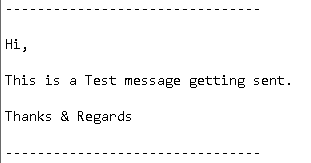
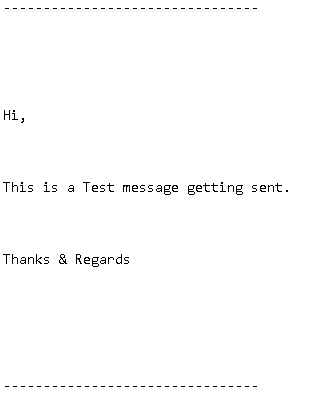
Issue: There are extra <br/> added to the each line in the message and it displays in Pega case as follows.
spacing between lines is increased as well.
Issue occurs to the emails which are generated and sent from the same domain. When sent from some users via outlook, it is displaying correctly.
Issue is happening when pega tool reads system generated email.
Accepted Solution
Updated: 13 May 2025 12:26 EDT

Pegasystems Inc.
GB

Vibrantech
US
@BuvaneshV you could apply an inline style, or custom css in the correspondence rule to change line-height. If doing embedded css, then in the correspondence rule 'source only' view format like the following:
<style>
br {
    line-height: 1; /* Adjust to reduce spacing */
}
((YOUR MESSAGE HERE))
</style>

Morgan Stanley
US
@bretw Above code will resolve issue while displaying the email content in the U. But if user send out email from the pega system with same content, then in outlook extra white spaces are getting displayed for each line of email content.
Updated: 8 Jan 2025 11:09 EST
Morgan Stanley
US
@MaleeshaW I see similar post by you a year back. Can you share the solution & code details if you have it.
Accepted Solution
Updated: 13 May 2025 12:26 EDT
Pegasystems Inc.
GB
@BuvaneshV no solution was provided in Maleesha's question (logged against Pega 8.7.4). You have mentioned you are on the same version, yet the version selected in the dropdown is Pega 8.8.1. Please confirm your version.
In the past our GCS team investigated and found that it's an issue with outlook/microsoft. The paragraph 'p' tag is including extra space in the outlook when we receive acknowledgement mail using correspondence from pega and this is getting added from outlook client.
Issue in the past was resolved after keeping the styles in a section or in correspondence rule and include in all of correspondences having this issue. Use the below steps: -
- Create Section and uncheck auto generated html box and add the below code there -
- Save the code and refer to the correspondence. -
- In correspondence include this section rule via Html rule section.
Formatting issues in outgoing emails such as line break characters might be caused by rich text editors like Microsoft Word. These editors use complex HTML formatting instructions that the email program may not interpret correctly leading to unexpected line breaks or formatting changes in the email content.
Please go through the available documentation:
@BuvaneshV no solution was provided in Maleesha's question (logged against Pega 8.7.4). You have mentioned you are on the same version, yet the version selected in the dropdown is Pega 8.8.1. Please confirm your version.
In the past our GCS team investigated and found that it's an issue with outlook/microsoft. The paragraph 'p' tag is including extra space in the outlook when we receive acknowledgement mail using correspondence from pega and this is getting added from outlook client.
Issue in the past was resolved after keeping the styles in a section or in correspondence rule and include in all of correspondences having this issue. Use the below steps: -
- Create Section and uncheck auto generated html box and add the below code there -
- Save the code and refer to the correspondence. -
- In correspondence include this section rule via Html rule section.
Formatting issues in outgoing emails such as line break characters might be caused by rich text editors like Microsoft Word. These editors use complex HTML formatting instructions that the email program may not interpret correctly leading to unexpected line breaks or formatting changes in the email content.
Please go through the available documentation:
Outgoing emails lose formatting
If you still need help I would suggest that you log a support incident via the MSP and provide the INC id here so we can help track it.
@BuvaneshV no solution was provided in Maleesha's question (logged against Pega 8.7.4). You have mentioned you are on the same version, yet the version selected in the dropdown is Pega 8.8.1. Please confirm your version.
In the past our GCS team investigated and found that it's an issue with outlook/microsoft. The paragraph 'p' tag is including extra space in the outlook when we receive acknowledgement mail using correspondence from pega and this is getting added from outlook client.
Issue in the past was resolved after keeping the styles in a section or in correspondence rule and include in all of correspondences having this issue. Use the below steps: -
Formatting issues in outgoing emails such as line break characters might be caused by rich text editors like Microsoft Word. These editors use complex HTML formatting instructions that the email program may not interpret correctly leading to unexpected line breaks or formatting changes in the email content.
Please go through the available documentation:
@BuvaneshV no solution was provided in Maleesha's question (logged against Pega 8.7.4). You have mentioned you are on the same version, yet the version selected in the dropdown is Pega 8.8.1. Please confirm your version.
In the past our GCS team investigated and found that it's an issue with outlook/microsoft. The paragraph 'p' tag is including extra space in the outlook when we receive acknowledgement mail using correspondence from pega and this is getting added from outlook client.
Issue in the past was resolved after keeping the styles in a section or in correspondence rule and include in all of correspondences having this issue. Use the below steps: -
Formatting issues in outgoing emails such as line break characters might be caused by rich text editors like Microsoft Word. These editors use complex HTML formatting instructions that the email program may not interpret correctly leading to unexpected line breaks or formatting changes in the email content.
Please go through the available documentation:
Outgoing emails lose formatting
If you still need help I would suggest that you log a support incident via the MSP and provide the INC id here so we can help track it.