
Question

Cognizant
IN
Last activity: 22 Oct 2022 0:13 EDT
Am creating one Report Definition using two different tables by using class joins, after that i created one Data Page in that Data
1) Am creating one Report Definition using two different tables by using class joins, after that i created one Data Page in that Data Page source i given which i created Report Definition at that time Data Page asking Response Data Transform mandatory Field (i.e happening only Data Page and Report Definition are different class) how can i write DT can anyone help me.
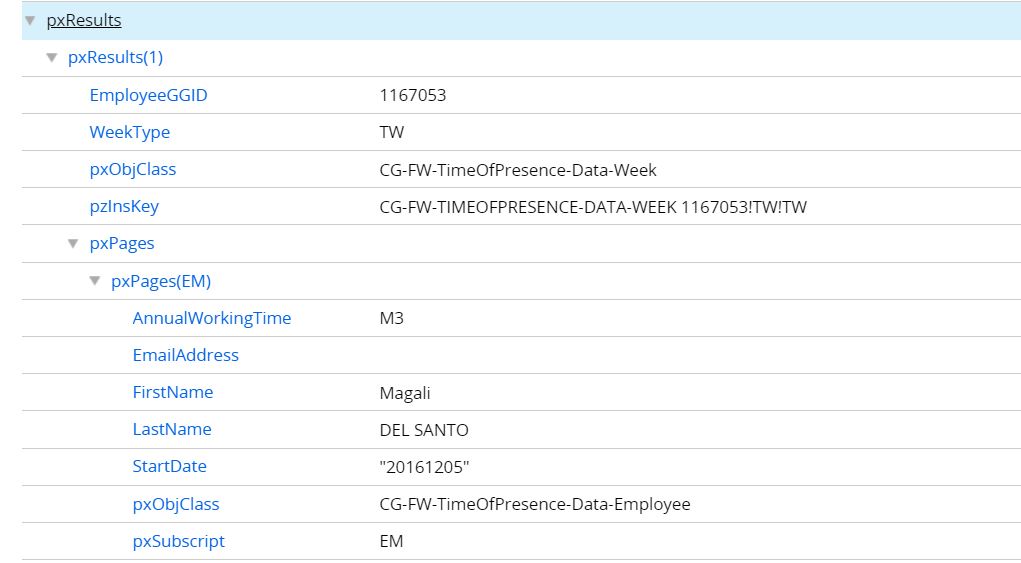
2) If Data Page and Report Definition are same class when i run the Data Page am getting results Like this below shown.one table details am able to see in pxResults and another table details am able to see in pxPage, but i need two table details in under pxResults only can anyone help me.

NCS Pte. Ltd
SG
Updated: 22 Oct 2022 0:13 EDT

brunomendes
BR
@ArulDevan I had to use the same approach due to pxPages(Example) not rendering properly on a Table, even when Pages&Classes are correctly set up in the Section. Noticed that when done this way you need to keep the "Control inherited from property" option.
One thing I did in order to reuse across the application was create a PagesMapping Single Page Property of type at Data-PagesMapping in the @baseclass.
- Class Data-PagesMapping would have Column1, Column2 and etc... [ A better Class name and attributes may used instead}

Hi @lingareddyd6529: Please find my views.
1. Data page and RD in different class: Please check why you need the Data page in a different class. If you can create the data page in the same class, your issue is resolved. Again, if you still need both the rules in different class, you can get the data from DataSource (temporary parameter page) page and can do the mapping using the response data transform. Please refer below.
Make sure you pass the parameter page to the response data transform from Data page (pass current parameter page), define DataSource page as parameter (page type) and in pages and classes.
2. When the Data page and Report are in the same class, as you mentioned, the details of the joined class will be available in pxPages(Subscript mentioned in join). Ideally you can use the same in places where the Data page is used.
Hi @lingareddyd6529: Please find my views.
1. Data page and RD in different class: Please check why you need the Data page in a different class. If you can create the data page in the same class, your issue is resolved. Again, if you still need both the rules in different class, you can get the data from DataSource (temporary parameter page) page and can do the mapping using the response data transform. Please refer below.
Make sure you pass the parameter page to the response data transform from Data page (pass current parameter page), define DataSource page as parameter (page type) and in pages and classes.
2. When the Data page and Report are in the same class, as you mentioned, the details of the joined class will be available in pxPages(Subscript mentioned in join). Ideally you can use the same in places where the Data page is used.
If you really need to add these join properties in pxResults, please note that you may need to create duplicate properties in the actual class to hold these values (this is not suggested). Still if you need to continue with this approach, Create a Data response tat transform (As your data page is list mode, this will create a data transform in Code-Pega-List class) -> Loop (for each page in ) .pxResults -> Set the newly created property ( which i mentioned as duplicate) and source as pxPages(EM).<Property> (here the EM referred is from your screenshot). So the data transform will be something like below. Note: in the loop you need to select "Also use each page as source context"
Suggestion: These are required only when you are doing complex data mapping. I strongly suggest to check the data structure and where the data pages are created. In common scenarios, these are not required.
Thanks