
DataGridView help
Hi,
I have created a robotics application where data can be searched for from an internal application, the data is then stored in a Lookup Table and displayed in a DataGridView.
The first time this application runs, the data outputs to the DataGridView all at once, however any time after this, the data outputs line by line, every time lookupTable/AddRecord is called - which I do not want.
I believe this is due to the DGV DataSource being set at the end of the first run, as part of the 'update_display' automation. Any time after that, because the DataSource is already set, it is just actively updating as any new data is added to the Lookup Table.
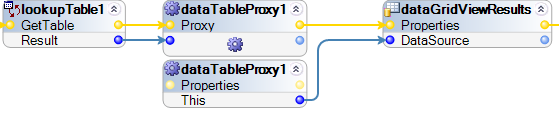
Is there a way to change my automation so that new Lookup Table data is not updated in the DGV until I specify that it should be?
Also, another question, is there a way to force the DGV to display scroll bars at all times?
Thanks,
Ryan
Accepted Solution

Endsleigh
GB

Pegasystems Inc.
US
Ryan,
The Datagridview should only update when the datasource is being pushed into the gridview. It sounds like maybe the Update_Display autx is repeatedly calling the autx sub section that you are showing in your screenshot.
You may want to use a boolean variable at the beginning of the autx that determines if you should update the datagrid at the point of the autx call. You can have the autx steps perform an update out of the true path of the variable and set it not to perform updates out of the false path.
As far as the datagrid always displaying a scrollbar. Unfortunately there is no option always display a scroll bar for the datagridview component. This a .NET component with limited display features.
What I would suggest is to place grid view inside of a smaller windows frame panel. Set the AutoScroll for the windows panel to true and set the DGV scrollbar option to off. By making the DGV larger than the panel, the panel will automatically enable the scrollbar for the panel at the start of the form. This will give the user the ability to always scroll through the view of the datagrid.
Pegasystems Inc.
US
Ryan,
Apologies, but I must correct an error regarding the lookuptable and DGV that I made in the last post. It has come to my attention that when sending the datasource of lookup table to a DGV, the DGV is automatically bound to the lookuptable datasource. So when the lookup table's datasource is updated, the DGV data is also updated regardless if the lookuptable datasource is being re-pushed into the DGV through autx.
However, you can stop the automatic update of the DGV, by using two lookuptables. One is used for udpating data within the lookuptable and the other is used for binding to the DGV.
You will need to make sure that both lookuptables have same exact schema for this to work. Please see the autx illustration below for more clarity.

Please note above how the boundtable is connected to the DGV in the designer.
I hope this helps. Please let me know if more clarification is needed.
Thanks,
Accepted Solution
Endsleigh
GB
Hi Thomz
Thanks for your response. My problems are solved now.
The update_display autx was not being repeatedly called, I had tested this with breakpoints. It does appear that once a DataSource is set for a DGV, any time that data is source is updated, so will be the DGV. I have tested this by setting the DataSource at the start, rather than the end, and items are now actively updated straight away. I will leave my automation this way - all data is updated the same now, plus it allows the user to see the autx working.
I attempted to implement your idea about the panel, however the scroll bars were only useful for getting the DGV back within the smaller size of the panel and that was all. The scroll bar did not increase in size as more data was added.
The reason I wanted permanent scroll bars was because my autx was crashing when the vertical scroll appeared, as data was being added. I have fixed this by setting the ScrollBars property to None whilst the automation is running and then setting it back to Both when the automation finishes, this seems to have fixed the crashing issue.
Thanks for your help.
Ryan
Hi Thomz
Thanks for your response. My problems are solved now.
The update_display autx was not being repeatedly called, I had tested this with breakpoints. It does appear that once a DataSource is set for a DGV, any time that data is source is updated, so will be the DGV. I have tested this by setting the DataSource at the start, rather than the end, and items are now actively updated straight away. I will leave my automation this way - all data is updated the same now, plus it allows the user to see the autx working.
I attempted to implement your idea about the panel, however the scroll bars were only useful for getting the DGV back within the smaller size of the panel and that was all. The scroll bar did not increase in size as more data was added.
The reason I wanted permanent scroll bars was because my autx was crashing when the vertical scroll appeared, as data was being added. I have fixed this by setting the ScrollBars property to None whilst the automation is running and then setting it back to Both when the automation finishes, this seems to have fixed the crashing issue.
Thanks for your help.
Ryan