
Question

GFT
BR
Last activity: 13 Oct 2023 21:32 EDT
Only Numbers in a text box
Hi, I am looking for a way to restrict a text box in a form in order to take only numbers and thus impede the user to put letters, specials caracters etc. I have seen few posts here but none of them seem to have worked for me.
here are some similar topics that I came across during the research on pega support area.
Number Format | Support Center (pega.com)
Validation to only allow numbers in a text box? | Support Center (pega.com)
On property field, in the "Advanced tab", the 'Use Validate' there are some options and the most relevant one was the method "IsInteger", but it is a big number with 11 characters and it won't take as it turn up an erro message saying it is not a valid integer.
Can someone please help with this?
I beforehand appreaciate your help.
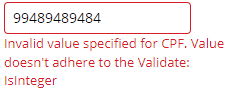
***Edited by Moderator Marije to add Capability tags***
Accepted Solution
Updated: 13 Oct 2023 21:32 EDT

Tata Consultancy Services
IN
Updated: 6 Oct 2023 11:32 EDT
Tata Consultancy Services
IN
May I know what kind of property type is used?
you use Property Type As: Text and Under Advanced Tab you can use validate: IsPosDecimal, so that It will allow only numbers.
I hope this will help you.
Thanks,
Ashok
Updated: 13 Oct 2023 11:03 EDT
GFT
BR
@Bhumireddy Hi Buddy
Thanks for the tip.
isPosDecimal indeed validates with big numbers which is the intent.
However, is there a way to remove/modify the message that it turns up like in the picture I've attached, it shows "3344839998T is not valid" which can be fine. Despite that, it is asking to enter a value such as 10.2 which is not the intent here, I mean, this field is not suppose to take dots, comma etc, just numbers and gives an invalid message.
If that's not possible, it is ok.
Thanks Bhumireddy.
Accepted Solution
Updated: 13 Oct 2023 21:32 EDT
Tata Consultancy Services
IN
We have to write our own java message or edit the field value for that, for the editing the field value is not best practice, any way you can try by using the saveas field value,
Rule Type: Field Value
Rule Name: pyMessageLabel • numeric_decimalMsgStr
Thanks,
Ashok
GFT
BR
Hi @Bhumireddy,
I think this can be a good solution. I'll be working on that as per your suggestion.
Thanks for your help throughout this process.
Regards.
Hi @ThiagoC16880758
We have to write our own java message or edit the field value for that, for the editing the field value is not best practice, any way you can try by using the saveas field value,
Rule Type: Field Value
Rule Name: pyMessageLabel • numeric_decimalMsgStr
Thanks,
Ashok