
Auto Complete Validation in Pega 8
Auto-Complete as a control does not validate the value selected or typed in manually is valid according to the source list of values.
so as a scenario, I have a region dropdown coming from Data page which has following values:
1. Australia
2. Singapore
3. Malaysia
4. India
5. Philippines
with this configured in Auto-Complete, I can type in "SG" and submit the form and validation would not trigger for the Auto-Complete value. I have to explicitly do validation in post activity for every Auto-Complete I have on my screen. For this there is a solution proposed in this link.
https://collaborate.pega.com/question/auto-complete-control-validaiton
Seems like the solution in above linked worked for Many in lower PEGA versions.. When I tried it in PEGA 8.5.1, this doesn't work for me.
Is there a workaround solution for this ?

Pegasystems Inc.
IN

Lloyds Banking Group
GB
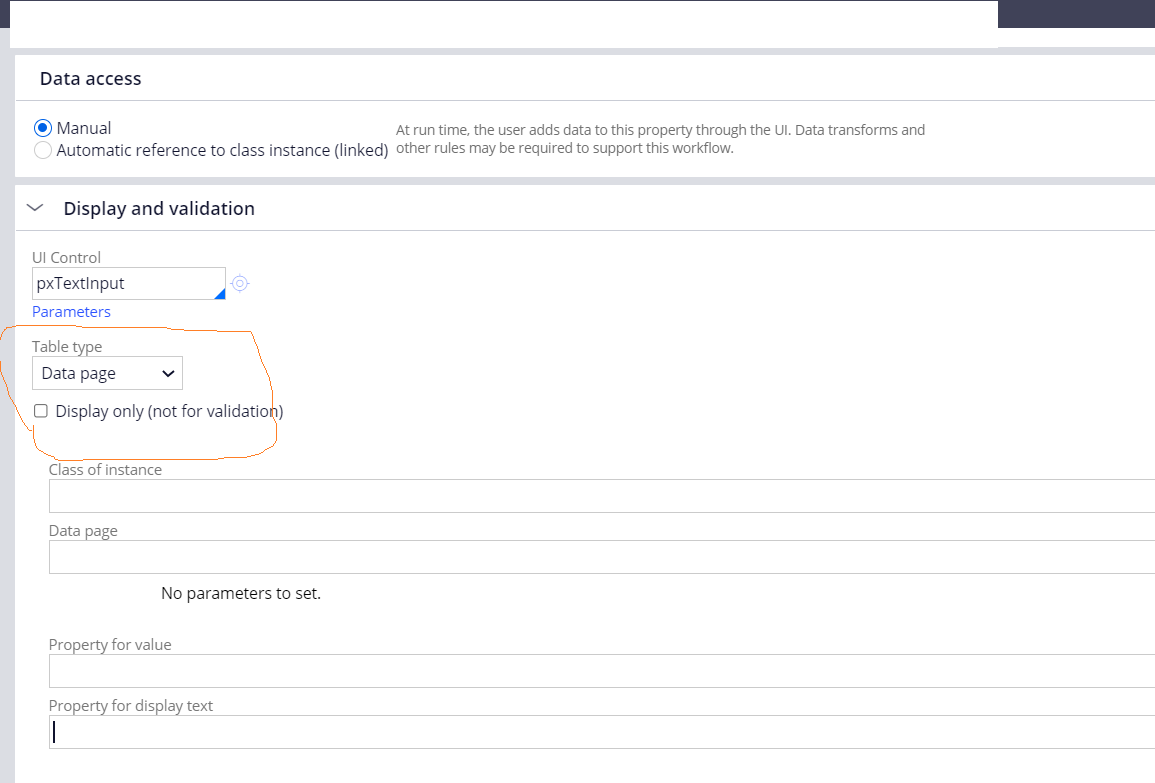
@SathyaG We've came across similar scenario and I've used property level validation using Data page as in below screenshot. We are loading the autocomplete values from data page.
Felt this was a easy configuration update compared to activities/validation rules. See if it helps.
@SathyaG
I understand that there are few enhancement request already raise for this issue and the Product Team has still not decided on it.
There is no Local-change or workaround that I am aware of for this issue.
Maybe you can tag the same guy in the given post who provide the custom script.