
Question

Lantiqx
Lantiqx
IN
Lantiqx
Posted: Jul 14, 2025
Last activity: Aug 17, 2025
Last activity: 17 Aug 2025 23:27 EDT
Getting Error while generating an application from blueprint after uploading YAML file in integration to generate Blueprint File
Hi Team,
I am facing an issue while generating an application from blueprint file, I have added YAML file while generating blueprint for Data Objects & Integration, it is detecting the file but while creating an application I am facing issue. Attached Issue screenshot for the reference.
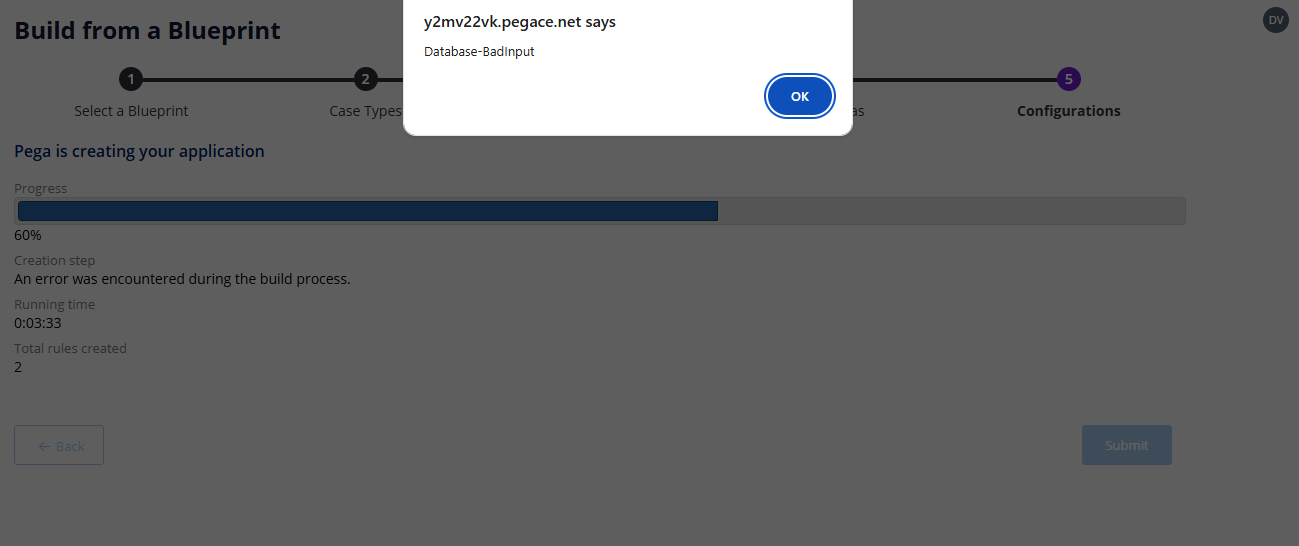
Any solution to solve this issue resolution will help us at the earliest.
Regards,
Mamatha Adiraju
Posted: 9 months ago

HCA Healthcare
HCA Healthcare
US
@MAMATHA Adiraju
Likely causes are a bad YAML shape or a version/feature mismatch. First, validate the YAML with a linter and Pega’s sample schema: use 2-space indentation, UTF-8 (no BOM), spaces not tabs, and remove comments/anchors; ensure required keys like application, version, dataObjects, integrations exist and names are unique. Keep only a tiny blueprint (one data object, no integrations) to confirm import works, then add sections incrementally to find the failing block. Check that your integration types and authentication blocks match what your Pega version supports; unsupported types or empty arrays commonly break generation. Verify object and property names use A-Z, a-z, 0-9, and _ only; avoid dashes and leading digits. If you referenced existing rules, confirm they exist in the target stack. Re-try in a fresh ruleset and clear server caches; then read PegaRULES log for the exact parse/validation error and enable DEBUG for blueprint import to get the failing path. If it still fails, export a working blueprint from App Studio and diff it against your YAML to spot structural differences.