

Executive Summary- Action Required
Pega regularly implements security controls designed to safeguard client environments. As part of these efforts, Pega is providing guidance regarding one high-severity security vulnerability in Pega Platform.
No compromises have been reported to date; however, reviewing and updating access roles is required to ensure continued security. There are no hotfixes or patch remediations as the functionality is already included in the product.
Impact
The product specifies permissions for a resource in a way that allows that resource to be read or modified by unauthorized actors.
Issue Details
|
Issue Details |
Incorrect Default Permissions |
|---|---|
|
Software/Product |
Pega Platform |
|
Affected Version(s) |
From 7.x to 25.1.2 |
|
CVSS Rating |
High– 8.7 |
|
Description |
Incorrect Default Permissions |
As a best practice, you should update your Pega environment to the latest release to take advantage of the latest features, capabilities, security, and bug fixes. See Keeping Current with Pega for details.
Guidance for reviewing and updating your systems
We are advising all clients to review the Access Groups available in their systems, and make sure that they match one of the following two states:
-
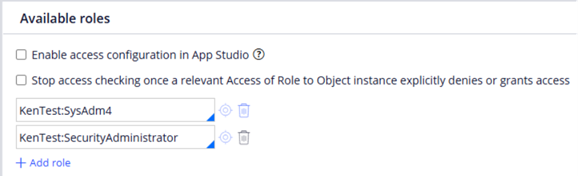
The PegaAPI role is not present because users of this Group have no need to interact with the Traditional DX APIs
-
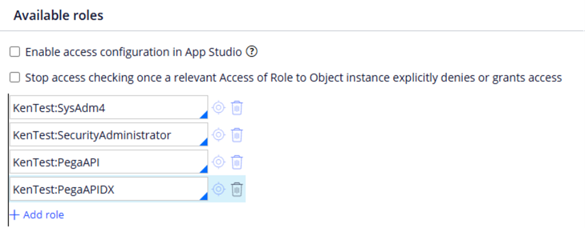
The PegaAPI role is present and paired with the PegaAPIDX role, because users of this Group do need to interact with the Traditional DX APIs
An access group should never have the PegaAPI role without the PegaAPIDX role. A common misconception is that the PegaAPI role is needed for use with Constellation; it is not needed.
Beginning with version 25.1.1, access groups assigned to Pega Blueprint-created users exclude the PegaAPI and PegaAPIDX roles by design.
a. Proper configuration for state 1:
Background
Over time, Pega added additional security features to the Traditional DX APIs. To avoid breaks in backwards compatibility, we issued these via additional privileges. These privileges are bundled into the [appname]:PegaAPIDX role. For more information about this role and the privileges within it, see Security Settings for Traditional DX API.
In certain rare circumstances, a client may not want every privilege in PegaAPIDX. For instance, a client may want GET /cases/{ID} to return the entire case, rather than just the fields of the Review harness, so they may create their own role similar to PegaAPIDX but that leaves out pxGetCaseDX. However, we strongly recommend our clients use every privilege in the role.
One of the privileges in the PegaAPIDX role, pxGetDataDX, restricts the GET /data/{ID} endpoint to access only those data pages in built-on applications that are marked API. To ensure that this security is in place, we also ship a dynamic system setting restrictDXAPIAccessToNonAPIDataPages in Infinity ’25.
This setting, which defaults to true, also enforces the same security condition. Our data page access logic checks both pxGetDataDX and restrictDXAPIAccessToNonAPIDataPages and only if both are turned off, it will allow access to non-API data pages in built-on applications. For more details, see Dynamic System Settings and Application Settings in DX API.
If you have questions or concerns, please raise a Support Ticket in My Support Portal.