

From the Pega Process and Task Mining portal, users who are assigned to the runtime analyst role can download different types of data exports. These exports are available in a comma-separated value (.CSV) format.
You can access the following data exports by using the Export API:
- Weekly or monthly aggregate date exports
- Default data export, which can contain one or more of the following types of data exports in a zipped file:
- Detailed daily raw data exports (High-Level data export)
- User’s hierarchy data export
- Processed export
- Workflow export
- Step export
You can enable either a weekly export or a monthly data export, but you cannot enable both exports at the same time. After the system creates the default data and the weekly or monthly export files, the data pipeline does not update or modify the historical export files.
By default, daily default reports and weekly default reports are enabled for you. To request any change to this configuration, enter a request through My Support Portal.
Due to the size of these exports, you might find the Export API to be the preferable method to gain access to the data to create your own reports and visualizations. After Pega enables the requested exports, you can use the Export API to create scripts to download and access the different types of data exports that are available to you. You can schedule and automate the export, download the export, and designate a centralized location to save the download.
Sample API Call for listing all available exports
https://clientname.pm.pega.com/api/v1/s3-exports
Sample API call for a weekly data export (if weekly data export is enabled)
https://clientname.pm.pega.com/api/v1/s3-exports/download?\fileName=exports/clientname_Data_Export_Weekly_20251102.csv
Sample API call for a monthly data export (if monthly data export is enabled)
https://clientname.pm.pega.com/api/v1/s3-exports/download?fileName=exports/clientname_Data_Export_Monthly_202511.csv
Sample API call for a default data export
https://clientname.pm.pega.com/api/v1/s3-exports/download?fileName=daily-event-exports/20251015-default-clientname.zip
Custom data exports
If you see a metric in the Process and Task Mining application, then Pega can include it in a custom data export. Use My Support Portal to request custom data exports.
Like default data exports, custom data exports are generated daily, weekly, and monthly and they can be accessed through the Export API.
Examples of custom data exports which Pega can build are:
- Administrator audit log
- Screen Rules export
Sample API call for a custom data export
https://clientname.pm.pega.com/api/v1/s3-exports/download?fileName=exports/clientname_custom_20251015.zip
Due to the detailed nature of the daily raw data export, it is recommended that you first review the data dictionary of high-level events. For more information, see High-level events.
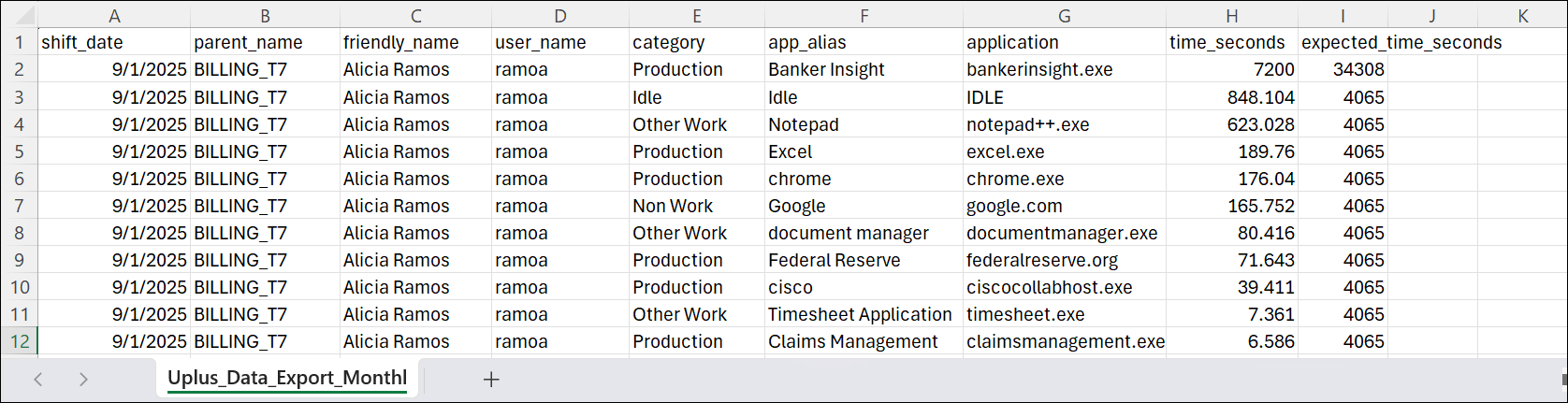
Monthly data export report example
Users report example

Workflow report example
The following series of figures provides examples of all the columns in the workflow report.


Step report example
The following series of figures provides examples of all the columns in the step report.


