
Question

Pegasystems Inc.
NL
Last activity: 30 Aug 2017 5:00 EDT
Decision Table Evaluate All Rows.
Hi,
I want to run a decision table that uses "Evaluate All Rows" option.
My goal is to Append a Pagelist with values from the results of the Decision Table.
I am using a simple strategy that is running a decision table.

The Decision Table Uses "Evaluate All Rows" and Calls a DataPage as the Action with a parameter
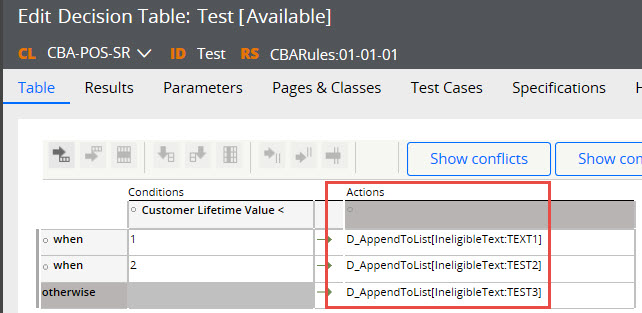
The DataPage calls a Data Transform with the provided parameter
Hi,
I want to run a decision table that uses "Evaluate All Rows" option.
My goal is to Append a Pagelist with values from the results of the Decision Table.
I am using a simple strategy that is running a decision table.
The Decision Table Uses "Evaluate All Rows" and Calls a DataPage as the Action with a parameter
The DataPage calls a Data Transform with the provided parameter

Lastly I use the Data Transform to append to my list

This seems to work when I DO NOT use the "Evaluate All Rows" option. The Data Page is created in the clipboard
When I use "Evaluate All Rows" option, the Data Page is not visible.
As previously stated my goal is to Append to a Pagelist by evaluating all rows of the decision table.
What could I be doing wrong, or is there a better practice to achieve the desired functionality.
Regards
Accepted Solution

Pegasystems Inc.
AU

Pegasystems Inc.
IN
From where are you calling the decision table?
Evaluate all rows does not return a page list or multiple output. But it can be used to set multiple values in a page list. You can use it to set values in the page list in the decision table itself.
-Saikat
Pegasystems Inc.
NL
I'm calling it from a strategy. As explained in the I'm not trying to return multiple values, but i'm trying to append to a list for each row in the decision table. The output of the decision table is irrelevant.
I was able to fix, and currently working with the setup I was asking.
Virtusa Consulting UK
GB
Hi,
You will need to make use of the Append pagelist syntax in the results column of the decision table.
Pegasystems Inc.
NL
Hi Katukshet,
Can you please elaborate how to do this without using data transform? How would you do it without using a datapage&data transform combo.
Regards,
Pegasystems Inc.
NL
Hi Santosh,
I was able to got it working as I explained in the example.
Hi,
Can you have a look into the following post and see if it helps:
https://community.pega.com/support/support-articles/decision-table-evaluate-all-rows-clears-column
When checking “Evaluate All Rows”, no value can be returned from the Decision Table. This is because all rows will be checked, and for each, their actions are performed when their condition is satisfied. So properties can be set, but no return value is allowed.