
Question

Virtusa
IN
Last activity: 17 Feb 2025 9:52 EST
How to identify checkout rules for a operator?
HI,
Is there an way in pega to identify what are the rules that are in check out by specific operator.
For ex: A is an operator i want to know what are all the rules in his private check out
Thanks.
Accepted Solution
Updated: 17 Feb 2025 9:52 EST

Tata Consultancy Services
IN
Tata Consultancy Services
IN
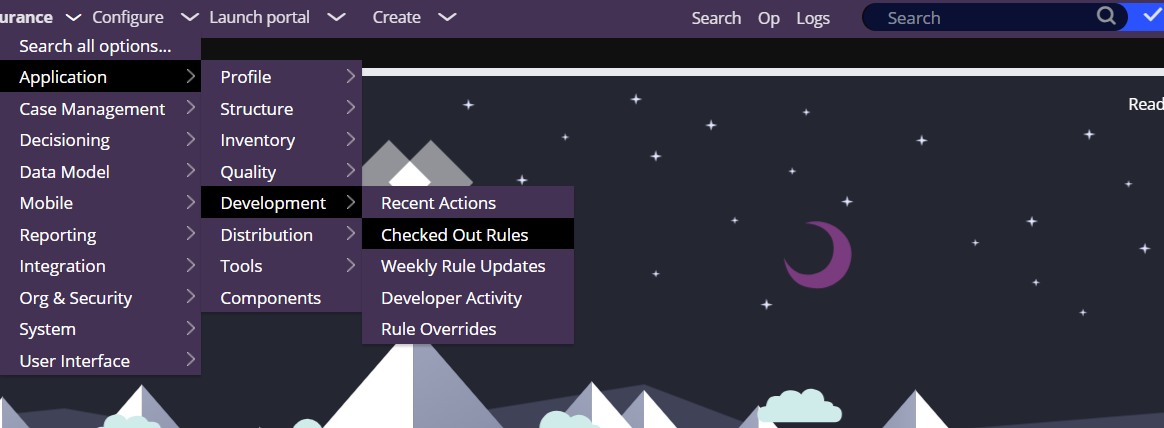
Please go through the below path to see the list of checkout rules along with the operator name.
Configure --> Application --> Development --> Checked Out Rules
I hope this will help you
Thanks,
Ashok
Virtusa
IN
Thanks for the response but this is not working I can’t see checked out rules here
Accepted Solution
Updated: 17 Feb 2025 9:52 EST
Tata Consultancy Services
IN
"Checkout rules definitely visible over the mentioned path"
What is meant by Check out?
You can't see Private Checkout Rules over the mentioned path, Private edit option available when the Ruleset is locked. This does not come under the Normal Check-out Rule. This is called Private Checkout Rules.
The Check-out option will be visible only for rules from Unlocked Rulsets. Those check-out rules are only visible in the mentioned path.
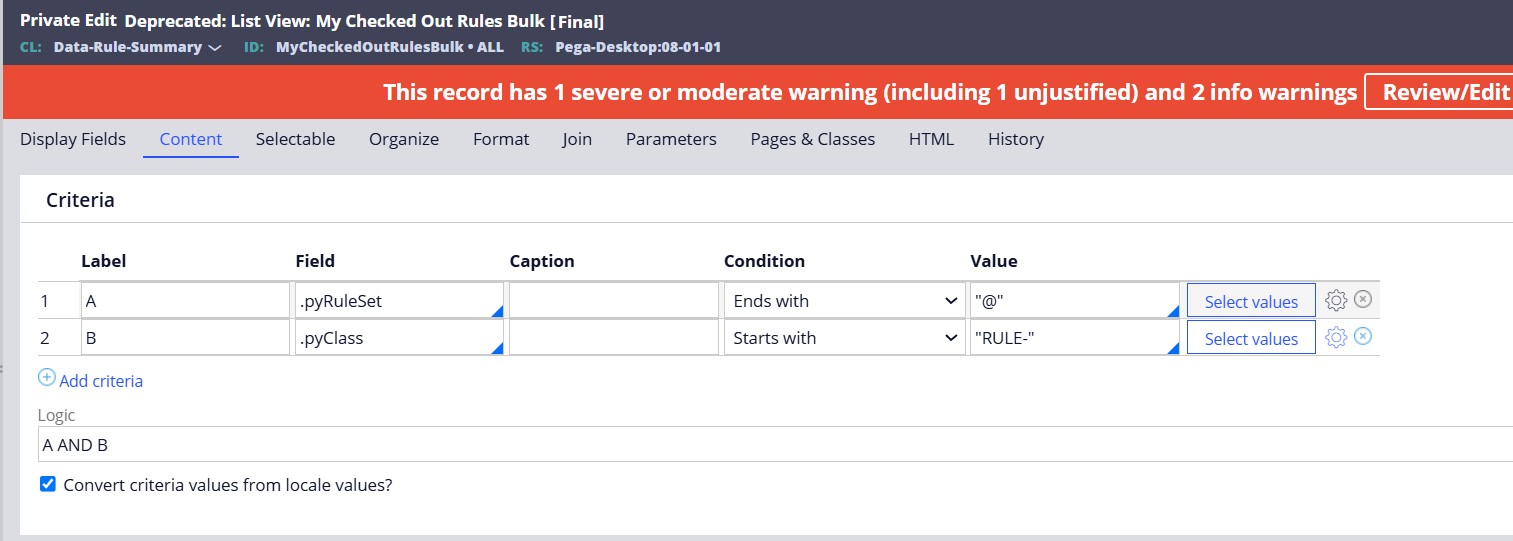
If you want to see other Operator Checkout Rules from Locked Rulsets and Unlocked Rulesets, please execute this rule: MyCheckedOutRulesBulk
Meanwhile, you have to do some private edit in the content tab as mentioned in the screenshot.
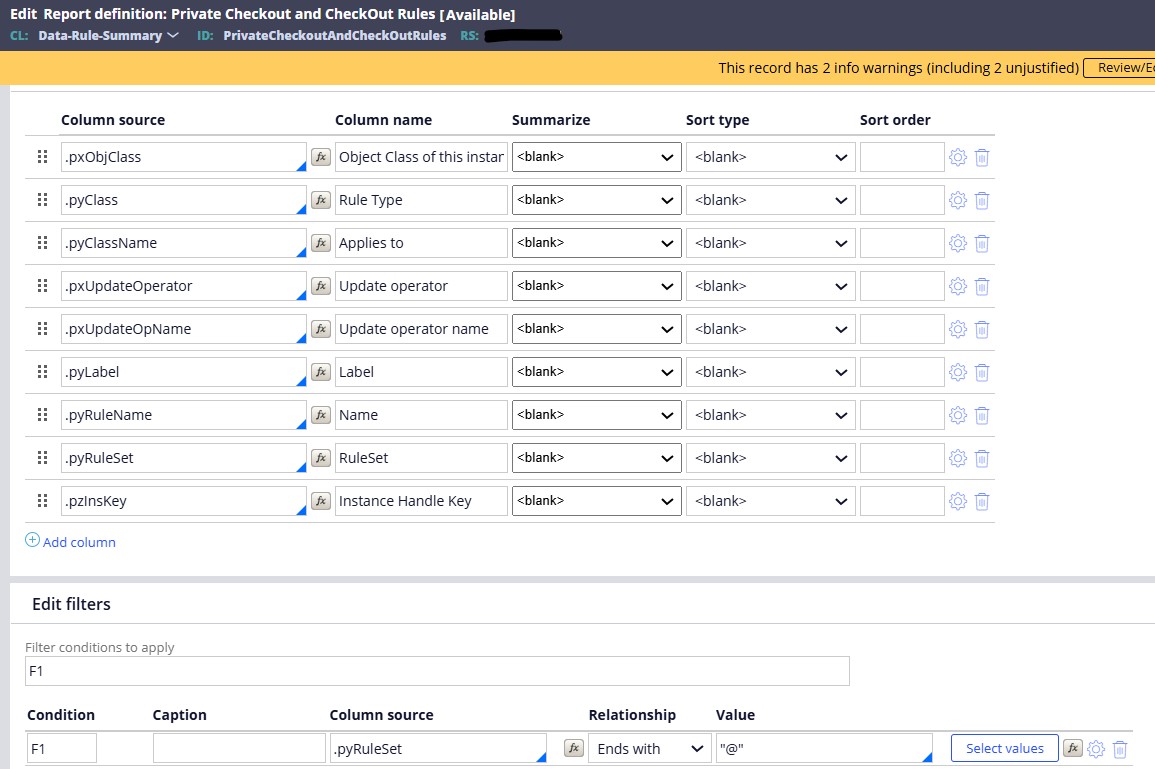
Or We can create our Own Report Definition in Data-Rule-Summary class.
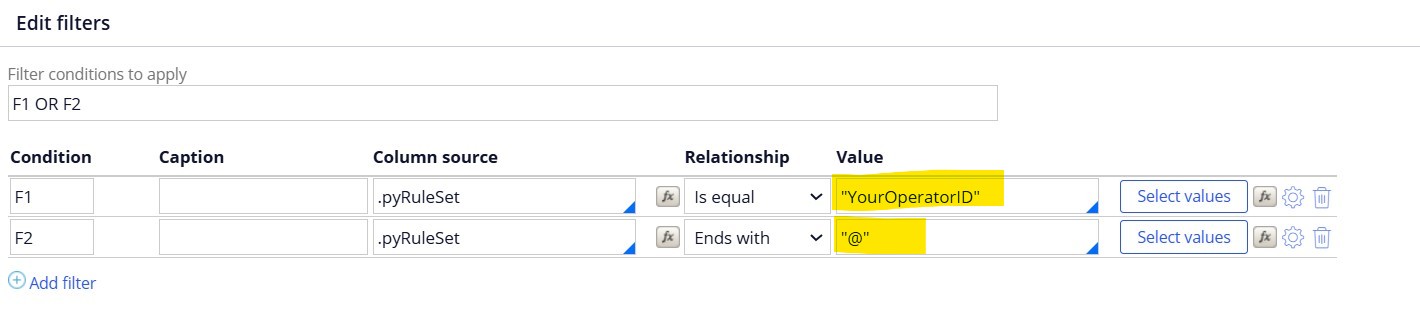
or another filter condtion
"Checkout rules definitely visible over the mentioned path"
What is meant by Check out?
You can't see Private Checkout Rules over the mentioned path, Private edit option available when the Ruleset is locked. This does not come under the Normal Check-out Rule. This is called Private Checkout Rules.
The Check-out option will be visible only for rules from Unlocked Rulsets. Those check-out rules are only visible in the mentioned path.
If you want to see other Operator Checkout Rules from Locked Rulsets and Unlocked Rulesets, please execute this rule: MyCheckedOutRulesBulk
Meanwhile, you have to do some private edit in the content tab as mentioned in the screenshot.
Or We can create our Own Report Definition in Data-Rule-Summary class.
or another filter condtion
If you have Query runner access in Pega or DB access you can execute below query.
select pxobjclass, pyclass, pyclassname, pxupdateoperator, pxupdateopname, pylabel, pyrulename, pyRuleSet, pzinskey from  rules.pr4_rule_vw  where pyRuleSet LIKE '%@';

or

select * from  rules.pr4_rule_vw where pyRuleSet LIKE '%@';
Note: The List will be other than you checked out rules both Unlocked and Locked, It means Other opeartor checkout rules both Locked and Unlokced rules
If you want see only particular operator checked out rules, Just pass in the filter condtion pyRuleSet Is Equal "OPID@" ( E.g: OPID@ -->abc@ ) and When adding a filter your OPID, not required @ symbol
I hope this will help you.
Thanks,
Ashok
Hi @Yasvanth Tanuku
"Checkout rules definitely visible over the mentioned path"
What is meant by Check out?
You can't see Private Checkout Rules over the mentioned path, Private edit option available when the Ruleset is locked. This does not come under the Normal Check-out Rule. This is called Private Checkout Rules.
The Check-out option will be visible only for rules from Unlocked Rulsets. Those check-out rules are only visible in the mentioned path.
If you want to see other Operator Checkout Rules from Locked Rulsets and Unlocked Rulesets, please execute this rule: MyCheckedOutRulesBulk
Meanwhile, you have to do some private edit in the content tab as mentioned in the screenshot.
Or We can create our Own Report Definition in Data-Rule-Summary class.
or another filter condtion
Hi @Yasvanth Tanuku
"Checkout rules definitely visible over the mentioned path"
What is meant by Check out?
You can't see Private Checkout Rules over the mentioned path, Private edit option available when the Ruleset is locked. This does not come under the Normal Check-out Rule. This is called Private Checkout Rules.
The Check-out option will be visible only for rules from Unlocked Rulsets. Those check-out rules are only visible in the mentioned path.
If you want to see other Operator Checkout Rules from Locked Rulsets and Unlocked Rulesets, please execute this rule: MyCheckedOutRulesBulk
Meanwhile, you have to do some private edit in the content tab as mentioned in the screenshot.
Or We can create our Own Report Definition in Data-Rule-Summary class.
or another filter condtion
If you have Query runner access in Pega or DB access you can execute below query.
Note: The List will be other than you checked out rules both Unlocked and Locked, It means Other opeartor checkout rules both Locked and Unlokced rules
If you want see only particular operator checked out rules, Just pass in the filter condtion pyRuleSet Is Equal "OPID@" ( E.g: OPID@ -->abc@ ) and When adding a filter your OPID, not required @ symbol
I hope this will help you.
Thanks,
Ashok